
Description
GreenPNG is a free, self-contained operations suite for independent WordPress site owners. It covers five areas in one local loop:
- Traffic security — a firewall that analyzes each request (country, network and company, hosting provider, crawler verification, and the browser and device its headers describe) against built-in and custom rules that allow, challenge, block, or temporarily ban; allow and block lists; a full analysis of any IP address; automatic bans for repeat offenders; and a lightweight client probe. Only high-confidence rules act out of the box (spoofed crawlers, HTTP tools on the login page); every other built-in rule starts in monitor mode, and verified search engine crawlers are never blocked.
- Marketing attribution — UTM and click-id capture, a 30-day signed visitor identity, first and last touch, and five attribution models computed locally.
- Funnels and A/B testing — funnel state machines, A/B exposure and conversion events with significance testing, and cart-abandonment capture with recovery links.
- CRM scoring — contact records with hashed emails, lead scoring, RFM segments, and tags. Security conclusions enter the CRM only as labels, never as raw signals.
- Local analytics — dashboards read daily aggregate tables rather than raw event tables, so reports stay fast as data grows.
Why another plugin?
- No telemetry, nothing outbound by default. The plugin never contacts a GreenPNG-operated server: no heartbeat, no version check, no statistics, no key validation. The only outbound requests are the optional integrations you configure yourself, each listed under External services and off by default.
- Privacy by default. Marketing data (attribution, behavior, CRM) stores anonymized IPs and identifiable collection is gated on visitor consent via the WordPress Consent API. Security logs keep full client IPs on a legitimate-interest basis, are masked when displayed, and can be switched to truncated storage (IPv4 /24, IPv6 /48) at any time.
- MySQL / MariaDB only. Schema discipline with dbDelta, atomic upserts for high-frequency writes, and no promises about other database engines.
External services
This plugin makes no outbound requests by default and never contacts a server operated by GreenPNG: there is no telemetry, no update check, and no license check. Every service below is optional, off until you enable it, and documented with what it is, which servers are called, what data is sent and when, and whether an account is needed.
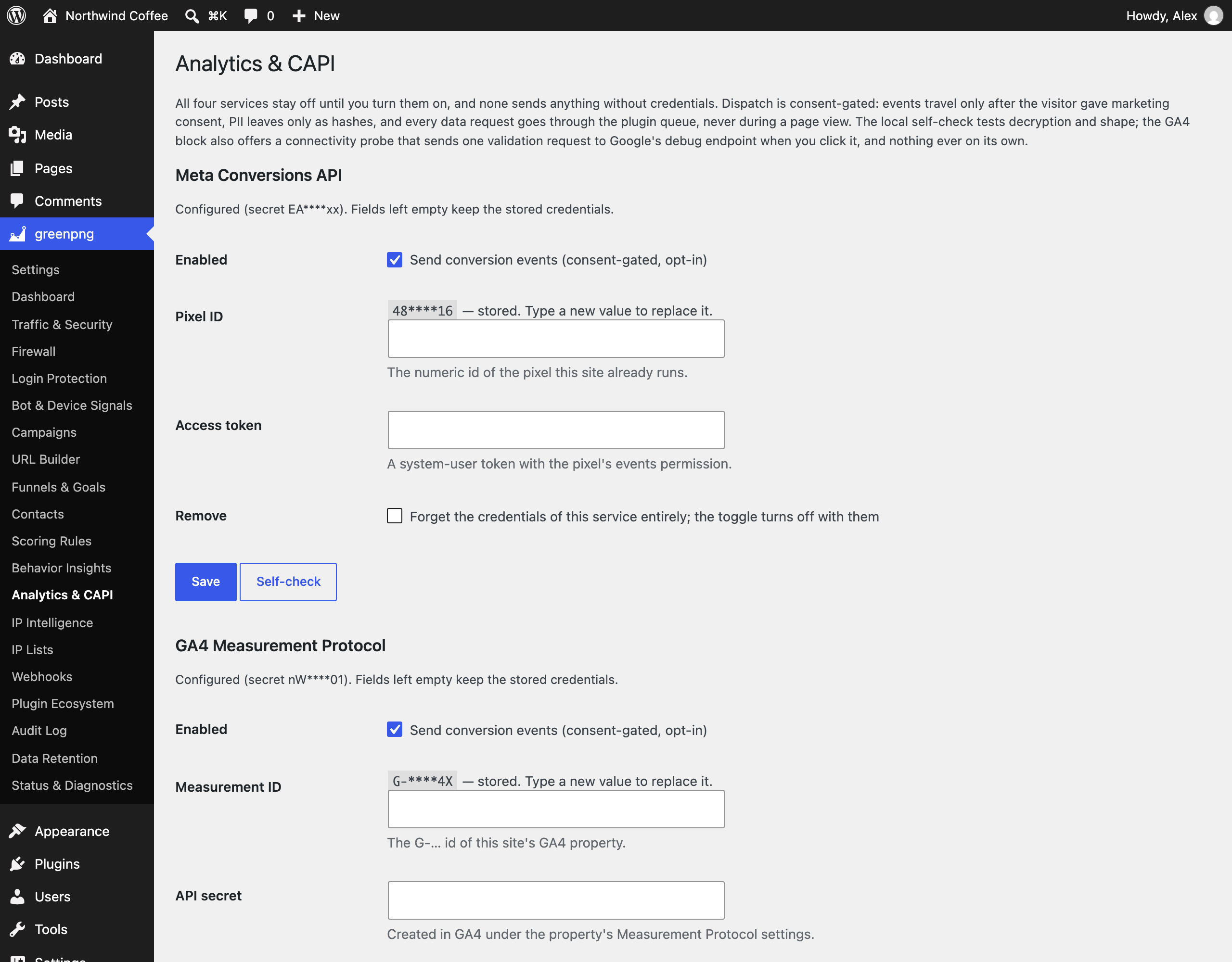
Conversion forwarding to Google Analytics 4, Meta, TikTok, and Matomo only happens for visitors who granted marketing consent through the WordPress Consent API, and only for sessions the bot filter did not flag. It covers paid WooCommerce orders, form leads (TikTok and Matomo only), and any custom event rules you create yourself on the Plugin Ecosystem page (GA4, Meta, and TikTok only; actions taken inside wp-admin are never forwarded).
Google Analytics 4 (Measurement Protocol)
- What it is: Google’s server-side API for sending events to a GA4 property. Used to record conversions in your own GA4 property.
- Servers: https://www.google-analytics.com/mp/collect for events, and https://www.google-analytics.com/debug/mp/collect only when you click “Test connection” in settings.
- Data sent: your measurement id and API secret, the event name, the client id read from the visitor’s own
_gacookie (at checkout it is saved with the order, so a payment the gateway confirms later still carries it; erased with the customer’s other order data), the value, currency, and transaction id of the order, and for custom event rules the line items (product id, product name, quantity, price). No event is sent for a visitor without a_gacookie. No email address, IP address, or user agent is sent. - When: on paid orders and on custom event rules, under the consent and bot-filter conditions above. The test button sends one validation request with a placeholder client id; Google’s debug endpoint validates it without storing it.
- Account: yes, your own Google Analytics 4 property with a measurement id and a Measurement Protocol API secret.
- Terms of service: https://marketingplatform.google.com/about/analytics/terms/us/
- Privacy policy: https://policies.google.com/privacy
Meta Conversions API
- What it is: Meta’s server-side API for reporting ad conversions to a Meta pixel.
- Servers: https://graph.facebook.com/{API version}/{your pixel id}/events
- Data sent: your access token, the event name, event time, and event id, the SHA-256 hash of the billing email when there is one, the order value and currency, and for custom event rules the line items (product id, quantity, price); custom-rule events without an email are not sent. No raw email, IP address, user agent, or page URL is sent.
- When: on paid orders and on custom event rules, under the consent and bot-filter conditions above. The thank-you page exposes the same event id as
window.GreenPNGPurchaseEventId, so a browser pixel you already run can deduplicate. - Account: yes, your own Meta pixel id and a Conversions API access token.
- Terms of service: https://www.facebook.com/legal/terms/businesstools
- Privacy policy: https://www.facebook.com/privacy/policy
TikTok Events API
- What it is: TikTok’s server-side API for reporting ad conversions to a TikTok pixel.
- Servers: https://business-api.tiktok.com/open_api/{API version}/event/track/
- Data sent: your access token (as a request header) and pixel id, the event name, event time, and event id, the SHA-256 hash of the email address when there is one, the plugin’s own pseudonymous visitor id as
external_id, the order value and currency, and for custom event rules the line items (product id, product name, quantity, price). No raw email, IP address, or user agent is sent. - When: on purchase and lead events and on custom event rules, under the consent and bot-filter conditions above.
- Account: yes, your own TikTok Ads pixel id and an Events API access token. This needs a TikTok Ads Manager account; in many regions TikTok requires business details or a business license to open one. Off by default.
- Terms of service: https://ads.tiktok.com/i18n/official/policy/terms
- Privacy policy: https://www.tiktok.com/legal/page/global/privacy-policy/en
Matomo Tracking (your own instance)
- What it is: the tracking API of a Matomo analytics instance that you host or rent yourself.
- Servers: only the
matomo.phpendpoint of the instance URL you enter in settings. Nothing is sent to any server run by Matomo or by us. - Data sent: your site id and auth token, the event name, order value and currency, and a 16-character visitor id derived by hashing the plugin’s own visitor id (Matomo’s cookies are never read).
- When: on purchase and lead events, under the consent and bot-filter conditions above.
- Account: your own Matomo instance and an auth token for it.
- Terms and privacy: governed by whoever hosts your instance; Matomo’s own policy is at https://matomo.org/privacy-policy/
Cloudflare Turnstile
- What it is: Cloudflare’s challenge widget that tells people and bots apart.
- Servers: the visitor’s browser loads https://challenges.cloudflare.com/turnstile/v0/api.js; your server verifies the result at https://challenges.cloudflare.com/turnstile/v0/siteverify
- Data sent: the browser sends the visitor’s IP address and your site key to Cloudflare while showing the widget. On submit, your server sends your secret key, the one-time widget token, and the visitor’s IP address. The token is never stored.
- When: only with the feature enabled and both keys set: on the login and registration pages after the same address has already failed twice, and on the firewall challenge page if you pick the CAPTCHA challenge method.
- Account: yes, a Cloudflare account with a Turnstile site key and secret key.
- Terms of service: https://www.cloudflare.com/terms/
- Privacy policy: https://www.cloudflare.com/privacypolicy/
hCaptcha
- What it is: an alternative challenge widget to Turnstile; enabling one switches the other off.
- Servers: the visitor’s browser loads https://js.hcaptcha.com/1/api.js; your server verifies the result at https://api.hcaptcha.com/siteverify
- Data sent: the browser sends the visitor’s IP address and your site key to hCaptcha while showing the widget. On submit, your server sends your secret key, the one-time widget token, and the visitor’s IP address. The token is never stored.
- When: only with the feature enabled and both keys set: on the login and registration pages after the same address has already failed twice, and on the firewall challenge page if you pick the CAPTCHA challenge method.
- Account: yes, an hCaptcha account with a site key and secret key.
- Terms of service: https://www.hcaptcha.com/terms
- Privacy policy: https://www.hcaptcha.com/privacy
AbuseIPDB
- What it is: a public IP reputation database, used here as background information on addresses that keep failing logins or form posts.
- Servers: https://api.abuseipdb.com/api/v2/check
- Data sent: your API key and the IP address being checked. Nothing else.
- When: only with the feature enabled and a key set, at most one lookup per address per 24 hours, and only after that address has failed repeatedly. Lookups stop on their own when the provider’s daily quota runs out. The result is advisory and never blocks anyone by itself.
- Account: yes, an AbuseIPDB account and API key (a free tier exists).
- Terms of service: https://www.abuseipdb.com/legal
- Privacy policy: https://www.abuseipdb.com/privacy
DB-IP Lite country database
- What it is: a free IP-to-country database. A copy ships with the plugin; this service only refreshes it.
- Servers: https://download.db-ip.com/free/dbip-country-lite-YYYY-MM.csv.gz (the current month’s file)
- Data sent: a plain download request. No visitor data and no site data.
- When: only when you click the update button in settings.
- Account: none, the file is a free public download.
- Terms and attribution: https://db-ip.com/
- Privacy policy: https://db-ip.com/privacy.php
MaxMind GeoLite2 Country
- What it is: MaxMind’s free IP-to-country database, an optional replacement for the bundled DB-IP data. The plugin never bundles it because its license forbids redistribution.
- Servers: https://download.maxmind.com/app/geoip_download
- Data sent: your MaxMind license key and the name of the requested edition (GeoLite2-Country). No visitor data.
- When: only when you click the download button on the IP Intelligence page.
- Account: yes, a free MaxMind account and license key.
- License (EULA): https://www.maxmind.com/en/geolite/eula
- Privacy policy: https://www.maxmind.com/en/privacy-policy
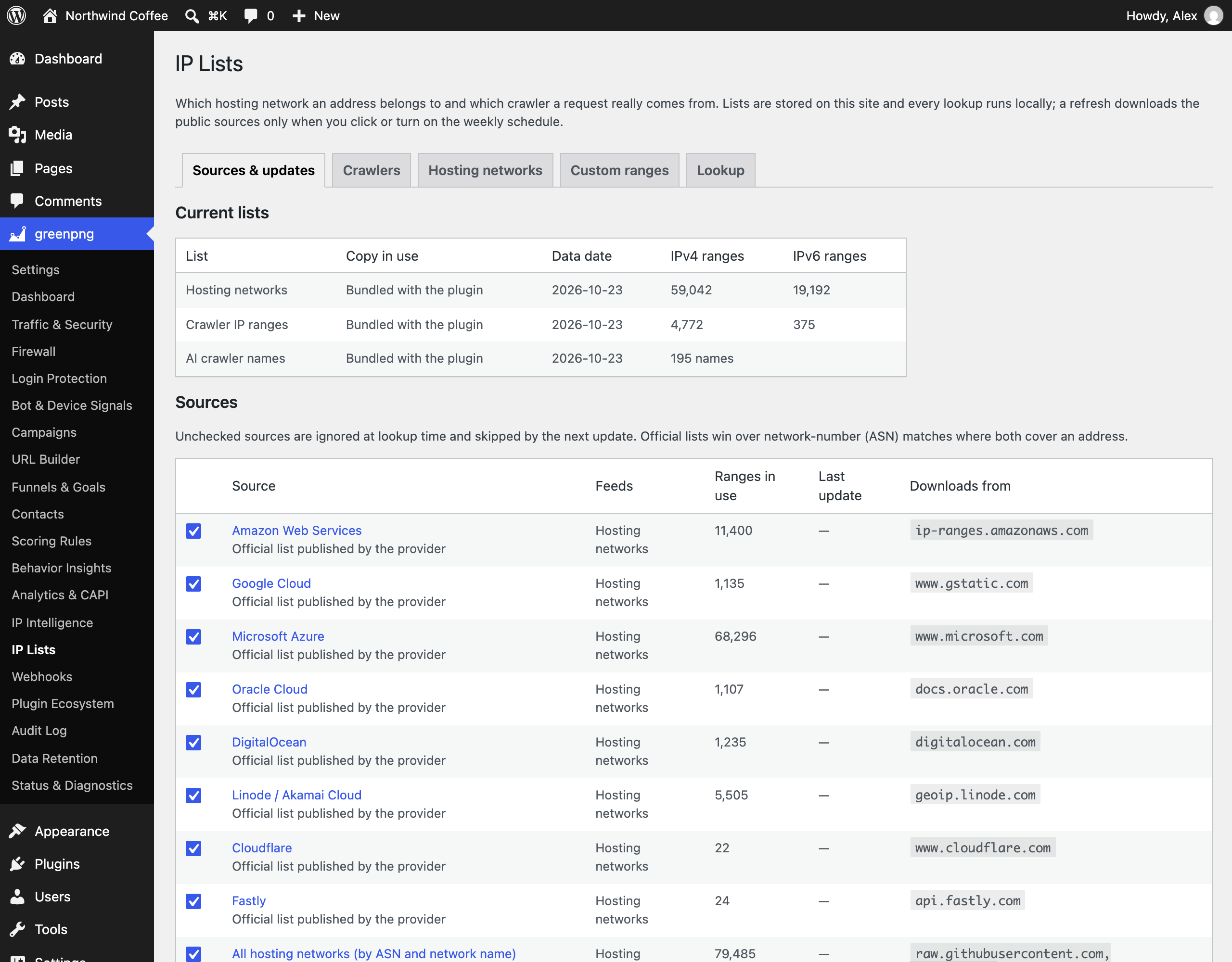
IP lists (hosting networks and crawlers)
- What it is: public lists of hosting and cloud network ranges, official crawler address lists, and AI crawler names. They label hosting traffic, confirm genuine crawlers, and drive the crawler actions you choose on the IP Lists page. A copy ships with the plugin; this service only refreshes it, and every lookup runs locally.
- Servers, one per source you leave enabled on the IP Lists page:
- Cloud and CDN providers: https://ip-ranges.amazonaws.com/ip-ranges.json, https://www.gstatic.com/ipranges/cloud.json, https://www.microsoft.com/en-us/download/details.aspx?id=56519 (which links to the current Azure Service Tags file on https://download.microsoft.com/), https://docs.oracle.com/en-us/iaas/tools/public_ip_ranges.json, https://digitalocean.com/geo/google.csv, https://geoip.linode.com/, https://www.cloudflare.com/ips-v4 and ips-v6, https://api.fastly.com/public-ip-list
- Hosting networks by network number (ASN): https://raw.githubusercontent.com/X4BNet/lists_vpn/main/input/datacenter/ASN.txt, https://raw.githubusercontent.com/brianhama/bad-asn-list/master/bad-asn-list.csv, https://iptoasn.com/data/ip2asn-combined.tsv.gz (about 9 MB, downloaded once per update and also used for the networks crawler operators run themselves and, if you turn it on, the optional full network database that names the network of every address)
- Crawlers: the JSON lists under https://developers.google.com/static/search/apis/ipranges/, https://www.bing.com/toolbox/bingbot.json, https://search.developer.apple.com/applebot.json, https://duckduckgo.com/duckduckbot.json and duckassistbot.json, https://openai.com/gptbot.json, searchbot.json and chatgpt-user.json, https://www.perplexity.ai/perplexitybot.json and perplexity-user.json, https://claude.com/crawling/bots.json, https://raw.githubusercontent.com/rezmoss/cloud-provider-ip-addresses/main/amazonbot/ (Amazonbot), https://index.commoncrawl.org/ccbot.json, https://api.ahrefs.com/v3/public/crawler-ip-ranges, https://uptimerobot.com/inc/files/ips/, https://my.pingdom.com/probes/ipv4 and ipv6, https://app.statuscake.com/Workfloor/Locations.php?format=txt
- AI crawler names: https://raw.githubusercontent.com/ai-robots-txt/ai.robots.txt/main/robots.json
- Data sent: plain download requests. No visitor data and no site data.
- When: only when you click “Update lists now”, or weekly if you turn on the optional schedule (off by default).
- Account: none, these are free public lists. The IP Lists page links each publisher’s page; each publisher’s own terms and privacy policy apply.
Outbound webhooks (your own endpoints)
- What it is: notifications to systems you choose (your own server, or a Feishu, WeCom, DingTalk, or Slack incoming webhook).
- Servers: only the https URLs you add on the Webhooks page. We do not choose or operate any of them.
- Data sent: the event name and its parameters in the receiver’s format, signed with an HMAC-SHA256 header. People appear only as the plugin’s hashed identifiers, never an email address. Security alerts carry the IP address masked to its network (for example 203.0.113.*).
- When: only for endpoints you added and activated, and only for the event names you subscribed them to. Failed deliveries retry twice (after 60 and 300 seconds) and then stop, with the failure shown on the status page.
- Account: none with us. Any account is the one you have with the receiving service.
SMTP delivery (your own mail server)
- What it is: sends this site’s email through an SMTP server you configure, instead of the host’s mail function.
- Servers: only the SMTP host and port you enter in settings.
- Data sent: your SMTP username and password, plus the email being sent. This covers the plugin’s own notifications (which show masked addresses and masked IPs only) and, while enabled, all other email the site sends through
wp_mail, such as WooCommerce order mail and password resets. The password is stored encrypted (AES-256-GCM) and never shown again. - When: only with the feature enabled and a host set. The “Send test email” button sends one message to the address you type.
- Account: yes, a mailbox on the SMTP server you choose.
Reverse DNS for crawler verification
To confirm that a visitor claiming to be a search crawler really is one, the plugin looks up its address through your server’s normal DNS resolver. No third-party API is called and no credentials are used. Only the verdict and the resolved hostname are stored.
Attribution
This plugin bundles a country-level IP geolocation database from DB-IP (https://db-ip.com/), used under CC BY 4.0. The exact data date is stated in the NOTICE file inside the plugin package.
The scanner user-agent detection rules bundled in assets/data/ are seeded from JayBizzle/Crawler-Detect (https://github.com/JayBizzle/Crawler-Detect), used under the MIT license, and maintained locally from that seed. The NOTICE file inside the plugin package states the license, source, and data date.
The bundled IP lists combine the address lists that providers and crawler operators publish themselves with network-number data from X4BNet lists_vpn (https://github.com/X4BNet/lists_vpn, MIT) and bad-asn-list (https://github.com/brianhama/bad-asn-list, MIT), the iptoasn.com database (https://iptoasn.com/, PDDL 1.0), Amazonbot ranges from cloud-provider-ip-addresses by rezmoss (https://github.com/rezmoss/cloud-provider-ip-addresses, CC0 1.0), and AI crawler names from ai.robots.txt (https://github.com/ai-robots-txt/ai.robots.txt, MIT). The NOTICE file inside the plugin package states the sources, licenses, and data date.
The dashboard charts use uPlot 1.6.19 by Leon Sorokin (https://github.com/leeoniya/uPlot), used under the MIT license. The unminified script ships beside the minified copy in assets/js/vendor/, and the stylesheet assets/css/uplot.min.css is built from dist/uPlot.min.css in that repository.
Screenshots



Installation
- Upload the
greenpngfolder to/wp-content/plugins/, or install it via the Plugins screen. - Activate the plugin. Tables and default settings are created on activation and repaired automatically if an update is interrupted.
- Optional but recommended on low-traffic sites: register a system cron entry running
wp greenpng maintenanceso daily maintenance runs on a fixed schedule instead of depending on visitor-triggered WP-Cron.
FAQ
-
Where is my data stored?
-
In your own WordPress database. The plugin creates fifteen tables prefixed with your table prefix plus
greenpng_, plus one autoloaded settings row. Nothing is stored anywhere off your site, and uninstalling keeps your data unless you enable the delete-on-uninstall option. -
Does this plugin contact any external server?
-
Not by default, and never a server operated by GreenPNG. Every outbound connection belongs to an optional feature that you switch on yourself: conversion forwarding to GA4, Meta, TikTok, or your own Matomo; Cloudflare Turnstile or hCaptcha challenges; AbuseIPDB lookups; webhooks and SMTP delivery to servers you choose; and data-file refreshes (DB-IP, MaxMind, hosting network and crawler IP lists) that run only when you click their update buttons or turn on the optional weekly IP list schedule. The External services section lists every server, the data sent, and whether an account is needed.
-
My site is behind Cloudflare or another CDN. Which visitor address is recorded?
-
When Cloudflare proxies the site, the plugin recognizes it on its own: requests whose connecting address is in Cloudflare’s published ranges (bundled with the plugin) are recorded under the address in the CF-Connecting-IP header. For Cloudflare Tunnel, other CDN and firewall services (Akamai, Fastly, Sucuri, Imperva, Amazon CloudFront, Alibaba Cloud CDN, Tencent EdgeOne), and load balancers, go to Settings, Security, Visitor addresses: add the addresses your proxy connects from, turn on “Trust proxy headers”, and pick the header it sets. The same section shows what was detected on your own request and which setting is missing. Headers from any other sender are ignored, because a visitor can forge them.
-
What personal data does the plugin keep, and how is it protected?
-
- Marketing-track data (sessions, touchpoints, behavior, CRM) stores anonymized IPs by default; identifiable marketing collection is gated on visitor consent through the WordPress Consent API.
- Security logs store full client IPs on a legitimate-interest basis (site protection, GDPR Recital 49), are masked in the admin by default, and can be set to truncated storage instead, with the admin clearly noting that blocking then degrades to subnet level.
- The client probe’s security module reports only automation conclusions (a bot score and automation flags) for form and checkout protection under the same legitimate-interest basis; it collects no fingerprint identifier strings, no canvas or audio data, and no persistent identifiers, and can be switched off with one setting. The behavior module (dwell buckets, deepest scroll milestone, rage clicks, dead clicks) is off by default and additionally gated on visitor consent through the WordPress Consent API; its click locators are structural (tag plus id or first class name), never page text or coordinates.
- Conversion forwarding to advertising and analytics services (GA4, Meta, TikTok, Matomo) is off by default and, once enabled, sends only for visitors with marketing consent whose session the bot filter did not flag. Meta and TikTok receive a SHA-256 email hash instead of the address and never the IP address or user agent; GA4 requires the visitor’s own
_gacookie. - Crawler verification resolves connecting addresses through your server’s normal DNS infrastructure and records only the verdict word and the resolved hostname on the security track; it uses no third-party API, stores no credentials, and a failed lookup always resolves to allow.
- Visitor identity: a 30-day signed cookie when consent allows it; otherwise a daily-rotated salted hash of the anonymized IP and browser type, which cannot link visits across days.
- Firewall challenge: a visitor who passes a firewall challenge receives the functional cookie
greenpng_pass(12 hours by default). It holds only an expiry time and a signature bound to the visitor’s IP address and browser, no identifier, and is never used for tracking. Request-header analysis reads the headers of the request in memory and stores nothing beyond the firewall log entry of a refused or flagged request. - The WordPress privacy API is supported where it applies: personal data export and erase handlers cover this plugin’s marketing tables (sessions, touchpoints, conversions, funnel journeys, the CRM contact row and its tags) and the visitor binding on orders. Security logs are retained on a legitimate-interest basis with short retention and masked display, and are intentionally outside person-level erasure.
- Email addresses are stored as a searchable hash plus encrypted form and are written only to the contacts table and, when cart-abandonment recovery is enabled, the cart-recovery table. Contact capture from forms happens only inside the marketing-consent gate; the admin shows masked addresses and an audited reveal; lead scores read the same event window retention keeps, and a suspected-bot verdict outranks every rule with a zero score.
- Cart-abandonment recovery is off by default and stays inside the consent gate: a checkout email is captured only behind an explicit opt-in checkbox on the classic checkout and on the block checkout (WooCommerce 8.9 or later; older block checkouts use the pending order), stored as a hash plus an encrypted envelope, and never written into the event stream. The recovery mail is sent by your site’s own
wp_mailafter the delay you set, carries the cart’s line items and two links (a one-time recovery link and a permanent unsubscribe link), keeps failed deliveries visible on the status page instead of silently dropping them, and the rows fall under the same 90-day retention plus the personal data export and erasure tools as the rest of the marketing track.
-
What does the client probe collect?
-
The probe has two modules. The security module loads by default and reports only automation conclusions (a bot score and automation flags); it never collects fingerprint strings, canvas or audio data, or persistent identifiers. It exists to protect forms and checkouts under GDPR legitimate interest (Recital 49) and can be switched off with one setting. The behavior module is off by default and additionally gated on visitor consent through the WordPress Consent API: both gates must open before anything is recorded. It reports four signals — dwell time in coarse buckets, the deepest scroll milestone reached, rage clicks (repeated rapid clicks on one spot), and dead clicks (clicks on non-interactive elements with no visible response). Click locators are structural only (tag plus id or first class name): never page text, never coordinates.
-
What does the CRM store from form submissions?
-
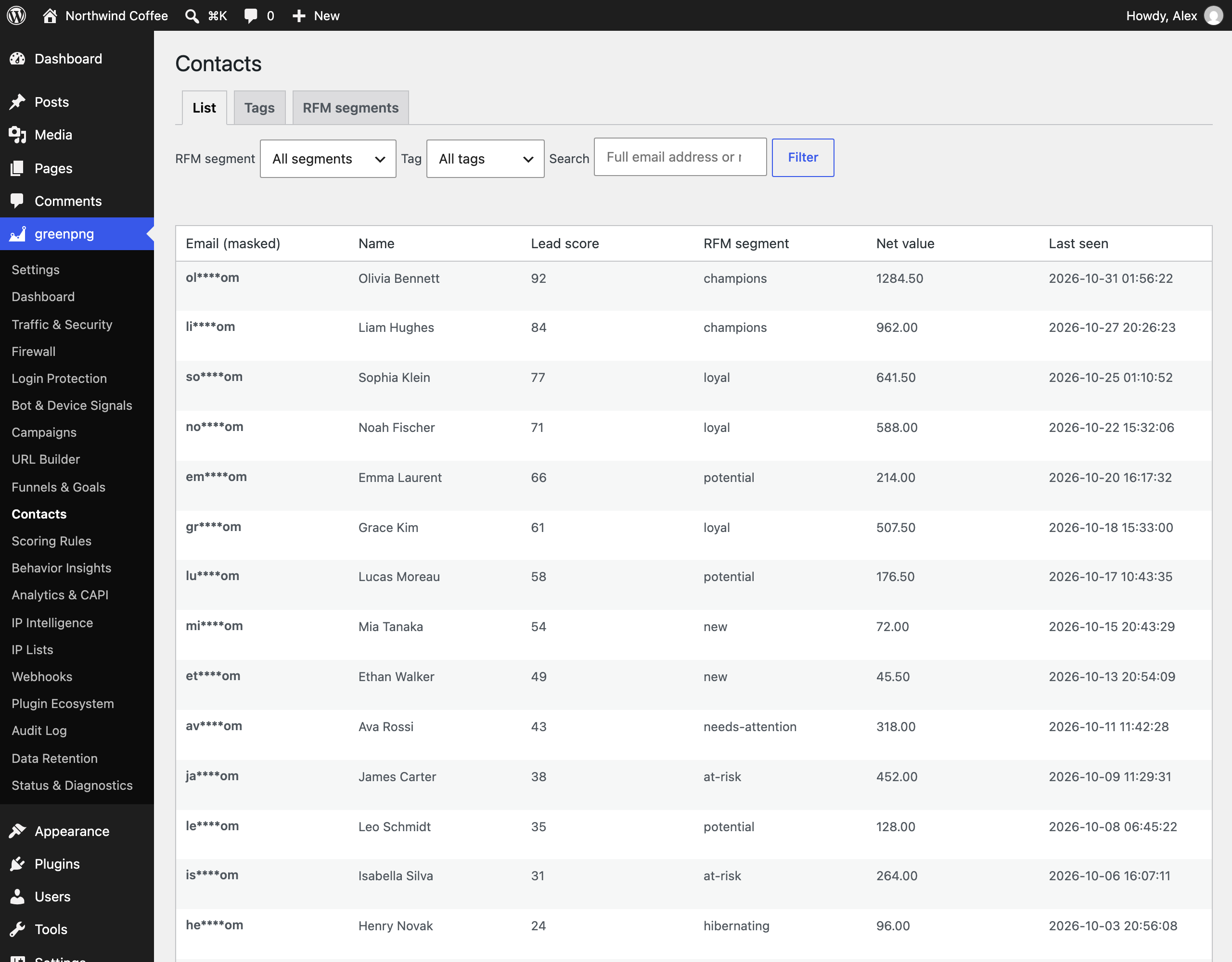
When a visitor with marketing consent submits a form on a supported form plugin, the CRM stores the submitted name and email address (the email as a searchable hash plus an encrypted copy), the cookie-track visitor binding, and derived state: a lead score computed from your scoring rules over the scoring window, and a customer segment refreshed nightly. Phone-number fields are not stored. Email addresses are shown masked in the admin and appear in plaintext only behind an audited reveal; the personal data export and erasure tools cover the contact row, its tags, and the visitor binding.
-
What do funnels record?
-
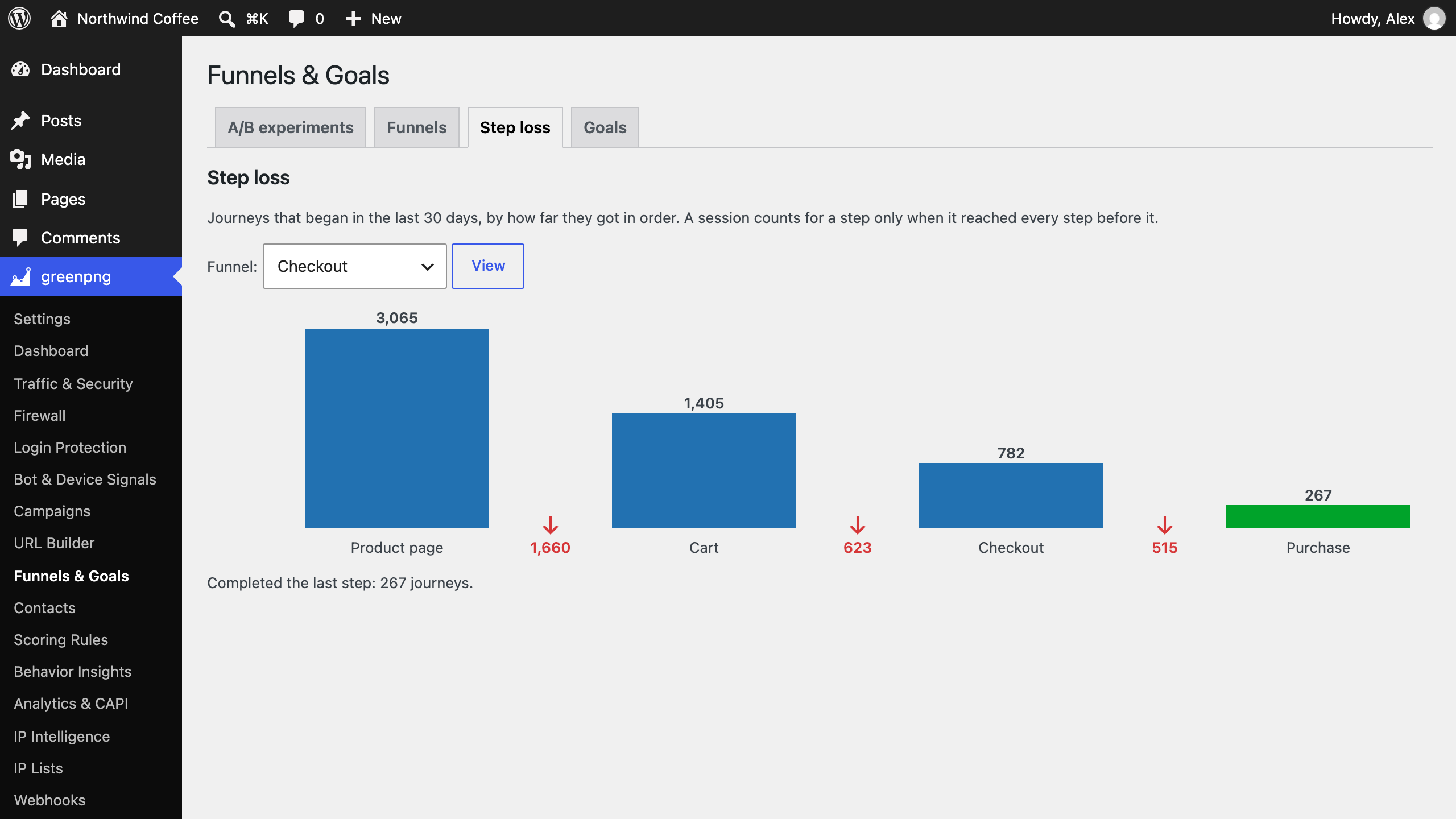
Funnel journeys derive from the events the stream already recorded: for each active funnel you define, the tracker stores how far each consented session got through the ordered steps. A journey row carries the session and visitor identifiers, the step position, and timestamps — never an email address, never an IP. Step matching uses pageview paths and a closed event vocabulary; probe verdicts are never steps. Journey rows follow the same 30-day retention as the events they derive from, and the personal data erasure tools remove a person’s journey rows together with their other marketing data.
-
What is cart-abandonment recovery and what does it send?
-
An optional WooCommerce feature, off by default until you enable it in Settings Attribution. On the classic (shortcode) checkout it adds one honest checkbox, “Send me a link to finish this purchase if I do not complete checkout”: only a checked box plus a typed email address (sent once on blur, then only when the address changes) captures a cart snapshot — the checkout email and the cart’s line items (product id, quantity, name; never addresses or payment details), stored with the consent snapshot taken at capture. On block-based checkouts there is no checkbox surface; there, a cart is captured only when an order is created in a pending state (a payment started but not finished), so a paid or in-transit order is never treated as an abandonment. After the delay you set (5–120 minutes), one recovery email goes out through your site’s own
wp_mail— the same channel your order emails already use, no third-party endpoint, nothing sent from the plugin’s side; if delivery fails it retries once after six hours, then stops and says so on the status page. The email carries a one-time recovery link and an unsubscribe link; unsubscribing is permanent for that address. Rows and their encrypted emails are kept for the 90-day retention window and are covered by the personal data export and erasure tools. -
What happens to my data when I uninstall?
-
It is kept by default. For a full wipe, enable the delete-all-data-on-uninstall option first; uninstalling then removes every
greenpng_table and option.
Reviews
There are no reviews for this plugin.
Contributors & Developers
“GreenPNG” is open source software. The following people have contributed to this plugin.
Contributors
Translate “GreenPNG” into your language.
Interested in development?
Browse the code, check out the SVN repository, or subscribe to the development log by RSS.
Changelog
1.3.0
- A new IP Lists page replaces the fixed datacenter and crawler sections. Hosting detection now covers every network on public hosting ASN lists, plus every network whose registered name marks it as an IDC, data center, server, VPS, cloud, or CDN operator (over 2,600 networks bundled), not only the large clouds, alongside official lists from AWS, Google Cloud, Azure, Oracle, DigitalOcean, Linode, Cloudflare, and Fastly.
- Crawler IP lists now include Google, Bing, Apple, DuckDuckGo, OpenAI, Perplexity, Anthropic, Amazon, Common Crawl, Ahrefs, and uptime monitors, the networks that Baidu, Yandex, 360, Seznam, Meta, ByteDance, X, LinkedIn, Pinterest, Telegram, Semrush, and the Internet Archive run for their own crawlers, plus a directory of AI crawler names. Each crawler category or single crawler can be allowed, monitored, or blocked; a claimed search crawler from a hosting network that fails verification is refused.
- Turn sources on or off, add your own ranges, import and export them as CSV, and look up any address. Updates run on your click or an optional weekly schedule (off by default), and a failed source keeps its previous ranges.
- Front-end requests no longer wait on reverse DNS: an unverified crawler is checked in the background and its verdict used from then on.
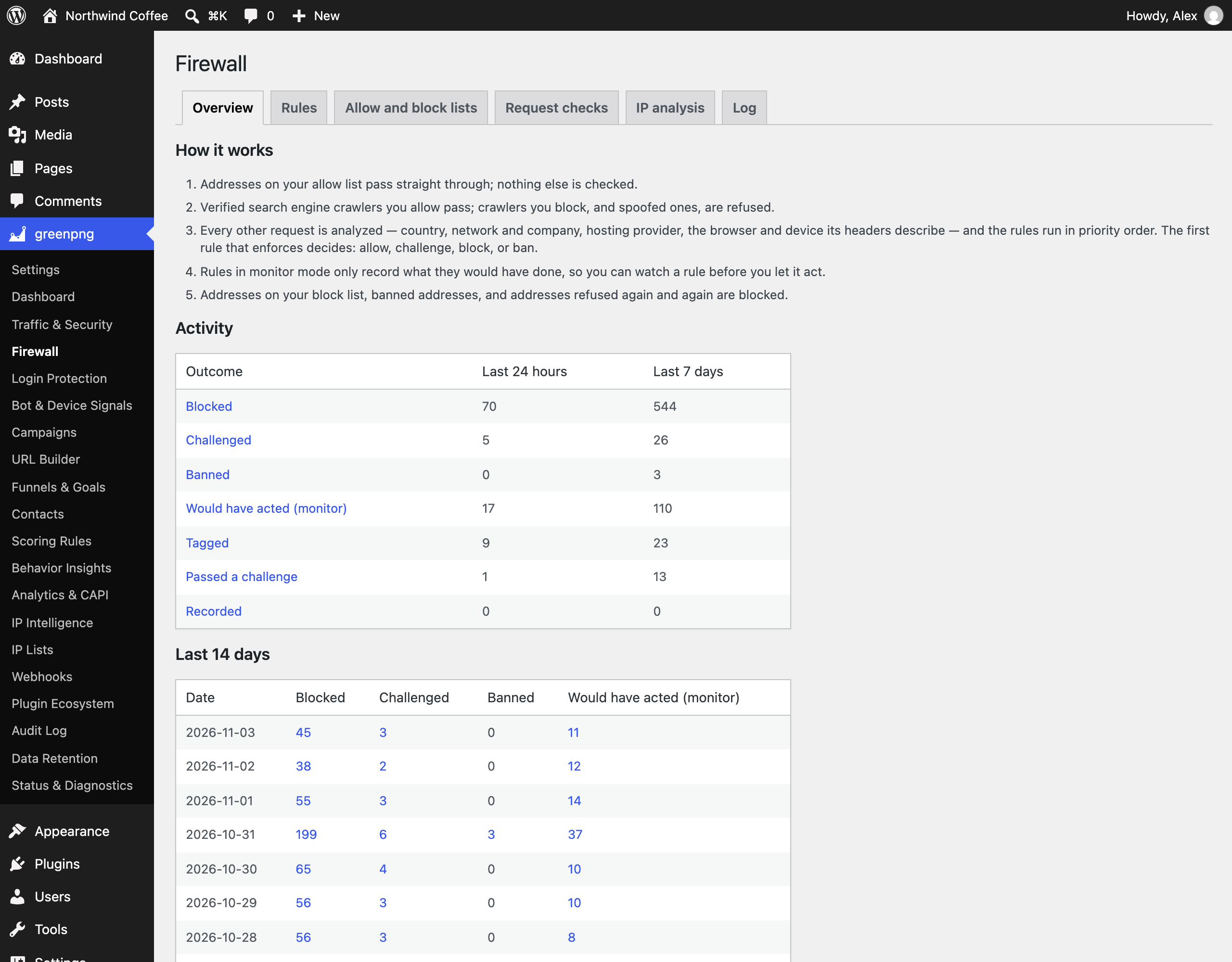
- New Firewall page: rules, allow and block lists, request checks, IP analysis, and the firewall log in one place, replacing the Access Rules page and the policy section of IP Intelligence. Existing rules carry over.
- Rules match on country, network (ASN), address ranges, hosting provider or category, crawler and crawler verification, device type, request-header signals and score, method, path, and user agent, with any/all matching, “not” conditions, priority, expiry, monitor mode, and JSON import and export.
- Every request not on the allow list is checked for browser and device consistency: tool and headless user agents, missing browser headers, client hints that contradict the user agent, outdated browsers, and sites requested by IP address.
- Challenges use a built-in browser check (no third party) or Turnstile or hCaptcha when configured. Addresses refused 20 times within 10 minutes are banned for 24 hours (adjustable).
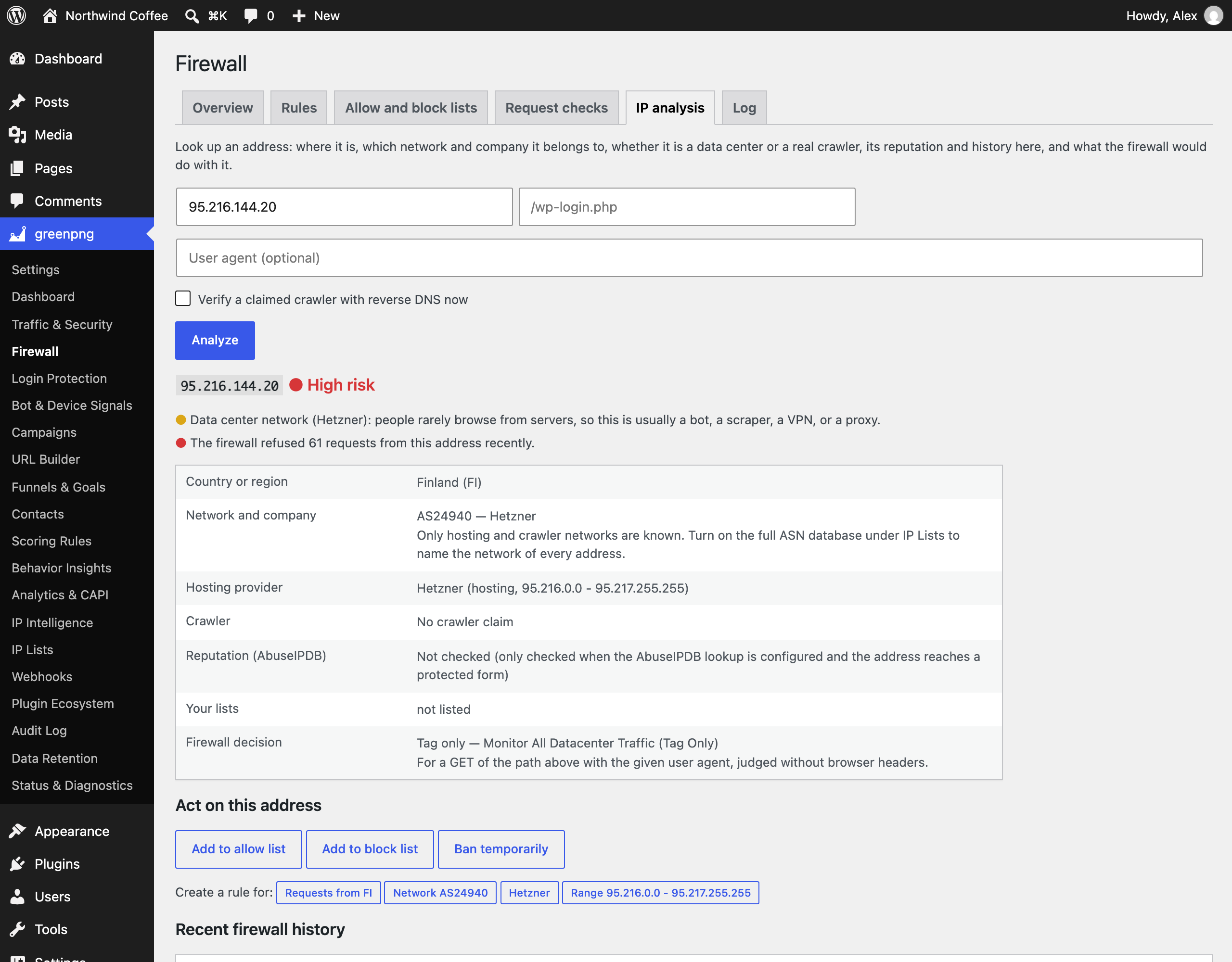
- IP analysis shows country, network and company, hosting provider, crawler verdict, reputation, list and ban state, history, and the rule that would apply, with one-click allow, block, ban, and rule creation. An optional full ASN database (off by default) names the network of every address.
- Existing custom datacenter ranges and the crawler schedule carry over on upgrade.
- Orders paid through offline gateways such as cash on delivery or bank transfer now reach GA4, Meta, TikTok, and Matomo when they move to Processing or Completed. Each order is sent to each service only once.
- GA4 purchases are no longer lost when the payment gateway confirms the payment later: the visitor’s GA client id is saved with the order at checkout.
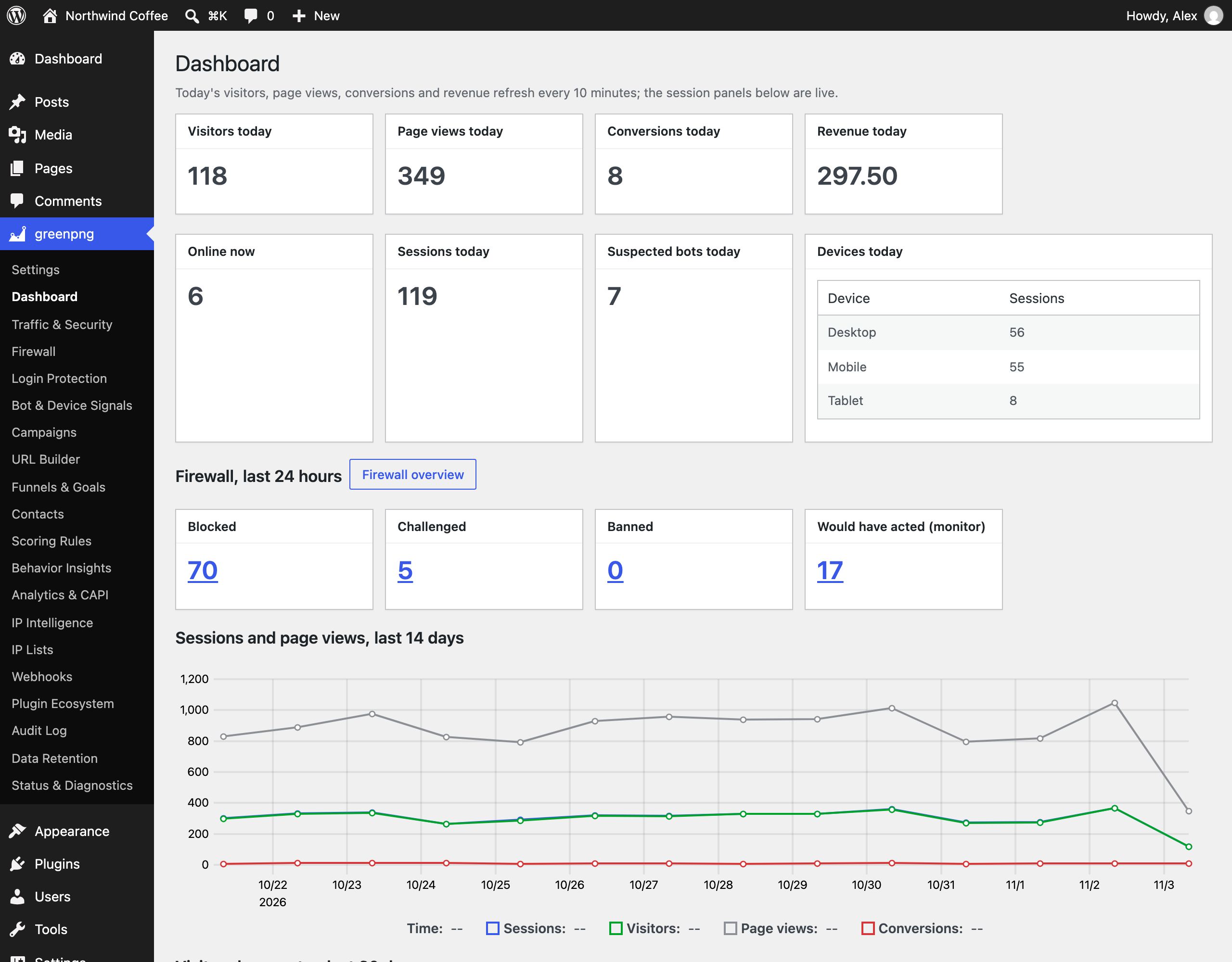
- Firewall reports: the overview adds a 14-day trend, the rules and detectors that acted most, and refused requests by country. The firewall log filters by date and by detector and exports to CSV. The dashboard shows the last 24 hours of firewall activity, and Threat events show rule names that link to the log.
- Login Protection and Bot & Device Signals are back in the plugin menu.
- Fixed: CSV exports downloaded as a quoted text string instead of a spreadsheet file. Cells that a spreadsheet would run as a formula are now neutralized.
- Fixed: firewall reports on sites outside UTC used windows shifted by the site’s time zone offset.
- Allow and block list entries can be paused and resumed from the list.
- The cart recovery opt-in checkbox now also appears on the WooCommerce block checkout (WooCommerce 8.9 or later). Uninstalling with “delete data” removes its stored value too.
- Contacts can be searched by full email address (matched against the stored hash, so the address itself is never searched in plain text) or by name.
- Status & Diagnostics adds a debug log (off by default, turns itself off after seven days) recording every outbound call and every error a module caught, with masked addresses and host-only URLs, plus a table of each outbound service’s failure state.
- The firewall’s refusal page now tells the visitor what happened and shows the address and time to give the site owner.
- Login Protection says whether lockouts are enforced or only recorded, with links to the security settings and the allow list.
- Login lockouts now have their own action, chosen on the Login Protection page or the Security tab: block sign-in and log it (the new default), or log only. A lockout only stops signing in; the locked address can still browse and buy. The honeypot and blackhole traps keep their own log-only default.
- The dashboard’s figures for today refresh every 10 minutes instead of once a day, the duplicate “Sessions today” card is gone, and visitors with no known country are counted in one “Unknown” row.
- Fixed: importing a firewall rules export onto a site that already had those rules added them a second time. Rules with a matching id are now updated in place.
- A cart recovery link that has expired now lands on the cart page with a note saying so, and a dead unsubscribe link answers with a short explanation instead of the home page.
- Settings: the Security, Attribution, and Notifications tabs are grouped under headings, attribution models have readable names, the consent fallback explains which features depend on it, and the Attribution tab warns when cart recovery cannot capture anyone because no consent source is available. Data Retention names each table in plain words.
- Fixed: the plugin menu listed the dashboard twice, and the dashboard’s figure cards ran one per row instead of on a grid. Country names now show on the dashboard as they do on the Firewall page.
- Uninstalling with “delete data” now also removes the plugin’s order meta, including on HPOS stores.
- Fixed: a live trace of one plugin also captured hooks from other plugins whose folder name starts the same way.
- Fixed:
wp greenpng unblockaccepted text that is not an IP address. - Fixed: MaxMind license keys issued since March 2023 (40 characters ending in “_mmk”) were refused on the IP Intelligence page.
- Sites behind Cloudflare now record the real visitor address with no setup: requests from Cloudflare’s published ranges use the CF-Connecting-IP header. Trusted proxies can now name the header they set, covering Cloudflare Tunnel, Akamai, Fastly, Sucuri, Imperva, Amazon CloudFront, Alibaba Cloud CDN, and Tencent EdgeOne, and the Security tab shows which CDN or firewall service was detected on your request and what to change when its headers are being ignored.
1.2.2
- Email notifications for conversions, leads, and lockouts, optional SMTP delivery, and the
greenpngprefix on every option, table, hook, and shortcode ([greenpng_ab]).
1.2.0
- Optional TikTok Events API and Matomo forwarding, progressive Turnstile or hCaptcha verification, AbuseIPDB reputation, MaxMind GeoLite2 support, webhook message formats for Feishu, WeCom, DingTalk, and Slack, and the Plugin Ecosystem page.
1.1.0
- Refund-aware revenue, visitor sessions, behavior insights, contacts with lead scoring and RFM segments, funnels and A/B experiments, cart recovery, datacenter ranges, and outbound webhooks.
1.0.1
- Bot verdicts on sessions, stricter ban handling, and offline-gateway order attribution.
1.0.0
- Initial release.