Skip to content
WordPress.org

English (Australia)

  • Themes
  • Plugins
  • News
  • About
  • Events
  • Get Involved
  • Glossary
  • Team (O2)
  • Get WordPress
Get WordPress
WordPress.org

Plugin Directory

Block User Account

  • Submit a plugin
  • My favourites
  • Log in
  • Submit a plugin
  • My favourites
  • Log in

Block User Account

By Dango Web
Download
  • Details
  • Reviews
  • Installation
  • Development
Support

Description

Block User Account gives administrators complete control over user account management. Block users temporarily or permanently, set custom block messages, send email notifications, and monitor all blocking activities with detailed logs.

Features:

  • Easy User Blocking: Block any user with one click from the users list or their profile page
  • Temporary Blocks: Set expiry dates for automatic unblocking after hours, days, or months
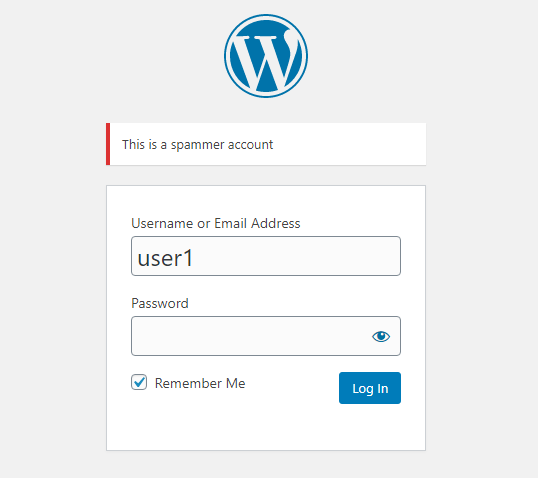
  • Custom Messages: Show personalized messages to blocked users when they try to login
  • Bulk Actions: Block or unblock multiple users at once with duration options
  • Email Notifications: Automatically notify users and admins about blocking activities
  • Activity Logs: Track all blocking and unblocking actions with detailed logs
  • Dashboard Widget: Quick overview of blocked users and recent activities
  • Admin Bar Menu: See blocked user count at a glance
  • Export Logs: Download activity logs as CSV files
  • Statistics Page: View blocking statistics and trends
  • RTL Support: Fully compatible with right-to-left languages
  • Translation Ready: Includes Persian translation

Credits

Developed by DangoWeb

Screenshots
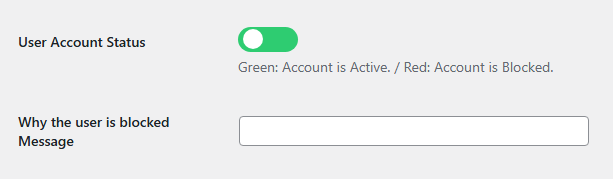
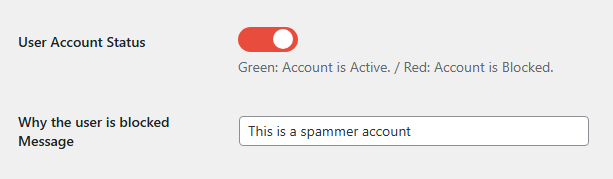
User profile block settings with toggle switch
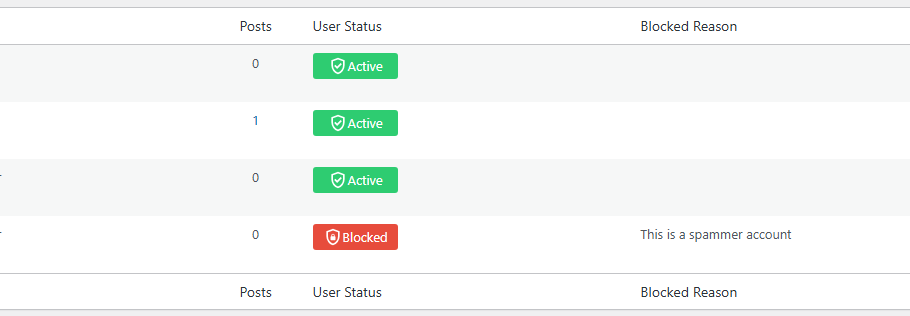
Users list with status columns and quick actions
Bulk actions with duration options
Plugin settings page with tabs

Installation

  1. Upload block-user-account folder to the /wp-content/plugins/ directory
  2. Activate the plugin through the ‘Plugins’ menu in WordPress
  3. Go to Users page to see block options
  4. Configure settings in Settings > Block User Account

FAQ

Can I block users temporarily?

Yes, you can set an expiry date for each block. The user will be automatically unblocked when the time expires.

Will blocked users receive notifications?

Yes, you can enable email notifications to inform users when their account is blocked or unblocked.

Can I customize the block message?

Yes, you can set a default message in settings or customize it per user in their profile page.

Is there a log of all blocking activities?

Yes, the plugin maintains a detailed activity log with timestamps, admin users, and reasons.

Can I block multiple users at once?

Yes, use the bulk actions dropdown in the users list to block or unblock multiple users simultaneously.

Reviews

Nice! Please add do_shortcode

dlx March 5, 2023
Thanks for that plugin – works great! I added do_shortcode in line 211 of block-user-account.php so the message can have a shortcode included then: $user_message = do_shortcode( get_user_meta($userinfo->ID, ‘user_status_message’, true) );

It would be great if it could be improved a little more.

aga2442 September 26, 2022
I tested 2 more plugins with this feature. This plugin gave the best results. It would be great if it could be improved a little more. e.g; It would be great to see all blocked users on 1 page.

افزونه ساده و کارآمد

Tara August 3, 2022
در عین سادگی بسیار کارآمد است. ممنون

Active/Disactive in bluk action

ahmadegbaria000 March 5, 2021 2 replies
Hi Very good plugin How can i active or disacrive user by bluk action? Without enter to user profile.. Thanks

افزونه عالی

mahdirabiee January 8, 2021
کاربردی است

Needs to some null checks

proximity2008 October 5, 2020 1 reply
You can’t just blindly hope that $_POST[‘user_status’] and $_POST[‘user_status_message’] are going to be there when you call bua_save_user_status It’s causing notices in my dev environments.
Read all 7 reviews

Contributors & Developers

“Block User Account” is open source software. The following people have contributed to this plugin.

Contributors
  • Dango Web

“Block User Account” has been translated into 2 locales. Thank you to the translators for their contributions.

Translate “Block User Account” into your language.

Interested in development?

Browse the code, check out the SVN repository, or subscribe to the development log by RSS.

Changelog

2.0.0

  • Complete plugin rewrite with OOP architecture
  • Added temporary block functionality with expiry dates
  • Added activity logging system with CSV export
  • Added email notifications for users and admins
  • Added bulk actions with duration options
  • Added statistics page with charts and trends
  • Added admin bar menu with blocked user count
  • Added dashboard widget with expiring blocks overview
  • Added settings page with professional UI
  • Added user profile block history
  • Added auto-unblock via cron jobs
  • Added tools section (check expired, clean logs, export)
  • Improved security with nonce verification

1.4

  • Added Persian translation
  • Fixed login authentication issues
  • Improved toggle switch design

1.3

  • Added bulk actions
  • Added user status columns

1.0

  • Initial release

Meta

  • Version 2.0.0
  • Last updated 2 days ago
  • Active installations 1,000+
  • WordPress Version 5.0 or higher
  • Tested up to 7.0
  • PHP Version 7.2 or higher
  • Languages

    English (US), German, and Persian.

    Translate into your language

  • Tags
    ban userblock userdisable accountuser management
  • Advanced View

Ratings

4.3 out of 5 stars.
  • 4 5-star reviews 5 stars 4
  • 1 4-star review 4 stars 1
  • 2 3-star reviews 3 stars 2
  • 0 2-star reviews 2 stars 0
  • 0 1-star reviews 1 star 0

Your review

See all reviews

Contributors

  • Dango Web

Support

Issues resolved in last two months:

0 out of 1

View support forum

Donate

Would you like to support the advancement of this plugin?

Donate to this plugin

  • About
  • News
  • Hosting
  • Privacy
  • Showcase
  • Themes
  • Plugins
  • Patterns
  • Learn
  • Support
  • Developers
  • WordPress.tv ↗
  • Get Involved
  • Events
  • Donate ↗
  • Five for the Future
  • WordPress.com ↗
  • Matt ↗
  • bbPress ↗
  • BuddyPress ↗
WordPress.org
WordPress.org

English (Australia)

  • Visit our X (formerly Twitter) account
  • Visit our Bluesky account
  • Visit our Mastodon account
  • Visit our Threads account
  • Visit our Facebook page
  • Visit our Instagram account
  • Visit our LinkedIn account
  • Visit our TikTok account
  • Visit our YouTube channel
  • Visit our Tumblr account
Code is Poetry
The WordPress® trademark is the intellectual property of the WordPress Foundation.