

Description
Stop guessing which AI crawlers visit your WordPress site. WPG AI Crawler Manager is the all-in-one control panel for AI bots: serve a clean llms.txt file, block ChatGPT / GPTBot / Claude / Perplexity / Google-Extended with per-bot robots.txt rules (or allow the crawlers you want), and watch live hit statistics — all stored locally on your own server. No third-party services, no accounts, no data ever leaves your site.
Whether you want to opt out of AI training, welcome AI search traffic, or practice generative engine optimization (GEO), this plugin gives you the switchboard — with a per-bot “last seen” log so you know exactly which AI engines are actually crawling you.
Features
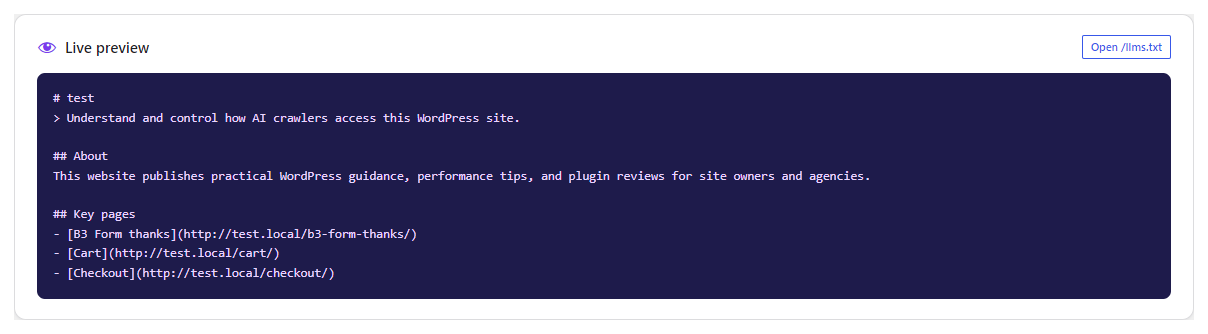
- llms.txt generator — publish a machine-readable
/llms.txtfile with your site name, a one-line description, an about paragraph and up to 20 of your best pages, so AI models and LLMs understand what your site is about. - 19 known AI crawlers, tracked — GPTBot, OAI-SearchBot, ChatGPT-User, ClaudeBot, Claude-SearchBot, Claude-User, Google-Extended, PerplexityBot, Perplexity-User, CCBot, Applebot-Extended, Bytespider, Meta-ExternalAgent, Meta-ExternalFetcher, Amazonbot, cohere-ai, Diffbot, ImagesiftBot and PanguBot, each labelled by organization and purpose (Training / Search / User-triggered / Aggregator).
- Block AI bots with robots.txt — a friendly segmented Default / Allow / Block control per bot, written straight into your
robots.txt. - Custom crawler rules — block or allow any AI bot that is not in the known list by entering its user-agent token; it is tracked, counted and written to robots.txt just like the known crawlers.
- Server-snippet helper — copy-paste Apache and nginx blocks for hosts whose
robots.txtis not served by WordPress. - Local hit statistics — see all-time totals, a 7-day bar chart and a per-bot breakdown with “last seen” timestamps, logged entirely in your own database (no phone-home).
- Polished dashboard — stat tiles, pure-CSS bar chart, status pills, and a reference guide explaining why you might block one crawler and allow another.
All rules are advisory (well-behaved bots obey them); bigger decisions like “training vs. search” are explained right in the Help screen so you can decide with confidence. Built and maintained by Rakesh Raja (WPGuru).
How it works
When enabled, the plugin intercepts /llms.txt as a virtual file, appends your per-bot rules to the robots.txt output, and watches the user-agent of every front-end visit to log recognized AI crawler hits locally. Every 5 minutes pending hits are merged into the stats, and old days are pruned automatically.
Who is this for?
- Site owners who want to block AI training crawlers (GPTBot, ClaudeBot, Google-Extended, Bytespider, CCBot) from scraping their content.
- Publishers who want AI search visibility and want to allow PerplexityBot, OAI-SearchBot and ChatGPT-User.
- SEOs and agencies adding GEO / AI visibility to their service stack — the dashboard gives you client-ready reports of AI crawler activity.
Screenshots




Installation
- Upload the
wpg-ai-crawler-managerfolder to/wp-content/plugins/, or use Plugins Add New Upload Plugin. - Activate the plugin.
- Open AI Crawlers in your admin menu.
- Set your llms.txt description and key pages, choose which AI crawlers to allow or block, and review the dashboard as hits come in.
No configuration file, no API keys, no external calls — everything works out of the box.
FAQ
-
How do I block ChatGPT or GPTBot from my WordPress site?
-
Open AI Crawlers AI Bots, set GPTBot (OpenAI’s training crawler) and/or ChatGPT-User to Block, and press Save. The rule is written to your robots.txt immediately.
-
What is llms.txt?
-
llms.txt is a proposed standard file (like robots.txt) written in Markdown that gives large language models a concise, structured summary of your site: what it is, what it is about, and which pages matter most. This plugin generates and serves it at
/llms.txtfor you. -
Does this plugin send data anywhere?
-
No. Hit statistics are recorded in your own WordPress database. The plugin never phones home and makes no automatic external HTTP requests.
-
Do blocked bots really stop?
-
robots.txt is advisory by design: standards-following bots respect it, but it is not a security mechanism against determined scrapers. For stronger enforcement, use the Apache/nginx snippets on the Settings screen.
-
Will blocking AI crawlers hurt my SEO?
-
Blocking training crawlers does not affect search rankings. Blocking search crawlers (like OAI-SearchBot or PerplexityBot) can reduce your visibility in AI answer engines — the Help screen explains each crawler’s purpose so you can choose per bot.
-
Why is my llms.txt not live?
-
Make sure the publish toggle on the llms.txt page is on and your permalinks are set to something other than “Plain”. WordPress must be serving pages from the site root for
/llms.txtto resolve. -
Which crawlers are tracked?
-
GPTBot, OAI-SearchBot, ChatGPT-User, ClaudeBot, Claude-SearchBot, Claude-User, Google-Extended, PerplexityBot, Perplexity-User, CCBot, Applebot-Extended, Bytespider, Meta-ExternalAgent, Meta-ExternalFetcher, Amazonbot, cohere-ai, Diffbot, ImagesiftBot and PanguBot. Not listed? Add any crawler yourself with a custom rule on the AI Bots page.
Reviews
There are no reviews for this plugin.
Contributors & Developers
“WPG AI Crawler Manager” is open source software. The following people have contributed to this plugin.
Contributors
Translate “WPG AI Crawler Manager” into your language.
Interested in development?
Browse the code, check out the SVN repository, or subscribe to the development log by RSS.
Changelog
1.0.0
- Initial release: llms.txt generator, per-bot robots.txt rules (plus custom crawler rules), Apache/nginx server snippets, and a local hit-statistics dashboard with per-bot “last seen” timestamps.