

Description
This Fathom Analytics partner plugin makes it easy to enable WordPress forms and pages as Fathom Analytics Events with no code.
👉 Go to the official Fathom Analytics plugin
What does this companion plugin do?
Makes it easy to track user actions such as form submissions and landing page visits as events in your Fathom Analytics account.
Best of all no technical knowledge is required to implement events on your site.
Key Features
- No code event tracking for marketers and website owners
- Common form plugins supported
- Make any page or post an Event
- Synchronized event names between website and analytics
Watch the setup walkthrough
This is not an official Fathom plugin
This WordPress plugin “Fathom Conversions” is not part of, or associated with “Fathom Analytics” by Conva Ventures Inc.
⚠️ Warning BETA API in use
This plugin uses the Beta Fathom Analytics API, which is still in early access, and subject to changes in the future, this plugin could stop working without warning if updates occur.
Privacy Notices
This plugin:
- does not track any users
- stores plugin settings and event mappings in the WordPress database
- sends data to the Fathom Analytics servers – more information can be found on Fathom Analytics website
Demo
You can find more information about the plugin, and see a demo and installation instructions on the Fathom Conversions website
Requirements
For this to work you will need a paid Fathom Analytics account (get $10 off your first month with this link)
And a supported WordPress plugin listed below installed and active.
Currently supported plugins
- Contact Form 7
- WPForms & WPForms Pro
- Gravity Forms
- Ninja Forms & Ninja Forms Pro
- Fluent Forms & Fluent Forms Pro
- WooCommmerce
For Developers
Fathom Analytics Conversions provides hooks and helper functions so that plugin and theme developers can fire Fathom conversion events from their own code.
Quick Start
The simplest way to fire a conversion from your plugin:
// Fire a basic conversion event.
add_action( 'wp_footer', function() {
    do_action( 'fac_track_event', 'My Custom Conversion' );
});

// Fire a conversion with a monetary value (in cents, e.g. 1999 = $19.99).
add_action( 'wp_footer', function() {
    do_action( 'fac_track_event', 'Premium Signup', 4999 );
});
The event name you pass here will appear in your Fathom Analytics dashboard. If the event doesn’t exist yet, Fathom will create it automatically on the first fire.
PHP Helper Function
You can also call the helper function directly:
/**
 * fac_track_conversion( string $event_name, int $value = 0 )
 *
 * Outputs a fathom.trackEvent() script tag on the frontend.
 * Must be called during or before wp_footer output.
 *
 * @param string $event_name  Event name (shown in Fathom dashboard).
 * @param int    $value       Optional. Value in cents. Default 0.
 */

add_action( 'wp_footer', function() {
    if ( function_exists( 'fac_track_conversion' ) ) {
        fac_track_conversion( 'Booking Confirmed', 15000 );
    }
});
Both methods automatically check that Fathom Analytics is active and respect excluded user roles — you don’t need to add those checks yourself.
Available Filters
You can customize event names for built-in integrations using these filters:
fac_woocommerce_order_title— Customize the WooCommerce order event name. Default: “WooCommerce Order”.fac_login_event_title— Customize the login event name. Default: “WP Login”.fac_registration_event_title— Customize the registration event name. Default: “WP Registration”.fac_lost_password_event_title— Customize the lost password event name. Default: “WP Lost Password”.
Example:
add_filter( 'fac_woocommerce_order_title', function( $title ) {
    return 'Shop Purchase';
});
Adding a Custom Integration to the Settings Page
Use these filters and actions to add your own integration checkbox to the plugin’s settings page:
// 1. Add a default option.
add_filter( 'fac4wp_global_default_options', function( $defaults ) {
    $defaults['integrate-my-plugin'] = false;
    return $defaults;
});

// 2. Add a checkbox to the Integration section.
add_filter( 'fac4wp_integrate_field_texts', function( $fields ) {
    $fields['integrate-my-plugin'] = [
        'label'           => 'My Plugin',
        'description'     => 'Track conversions from My Plugin.',
        'phase'           => 'fac4wp-phase-stable',
        'plugin_to_check' => 'my-plugin/my-plugin.php',
    ];
    return $fields;
});

// 3. Fire the conversion when your plugin's action completes.
add_action( 'wp_footer', function() {
    $options = get_option( 'fac4wp-options', [] );
    if ( ! empty( $options['integrate-my-plugin'] ) && my_plugin_conversion_happened() ) {
        do_action( 'fac_track_event', 'My Plugin Conversion' );
    }
});
JavaScript API
If you need to fire a Fathom event directly from JavaScript (e.g., after an AJAX action), you can call the Fathom tracking function directly. The Fathom Analytics script exposes a global fathom object:
// Basic event
fathom.trackEvent('My JS Event');

// Event with monetary value (in cents)
fathom.trackEvent('My JS Event', { _value: 1999 });
Note: The fathom object is only available on the frontend when the Fathom Analytics plugin is active and the tracking script has loaded.
Utility Functions
These functions are available for checking the plugin state:
is_fac_fathom_analytic_active()— Returnstrueif Fathom Analytics tracking is active.fac_fathom_is_excluded_from_tracking()— Returnstrueif the current user’s role is excluded.FAC_Options::get( $key )— Retrieve a specific plugin option value.
Screenshots
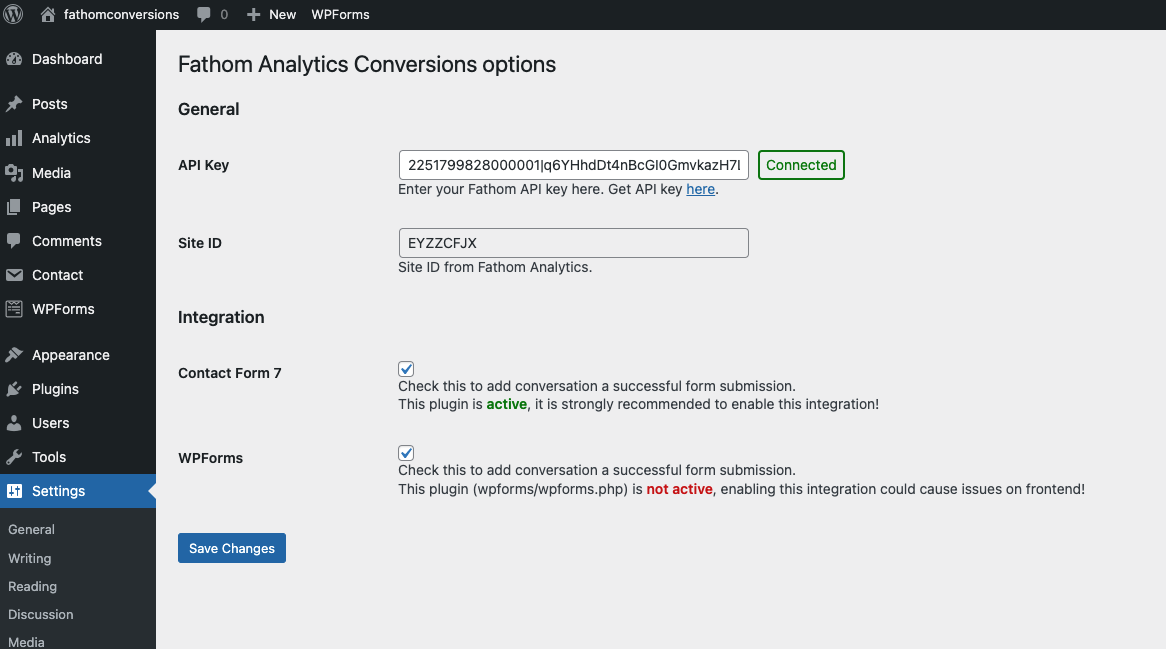
Add your API Key here, and enable / disable integrations via the plugin settings. 
We display the Event ID created by the plugin in the Fathom Dashboard, on a tab in Contact Form 7. 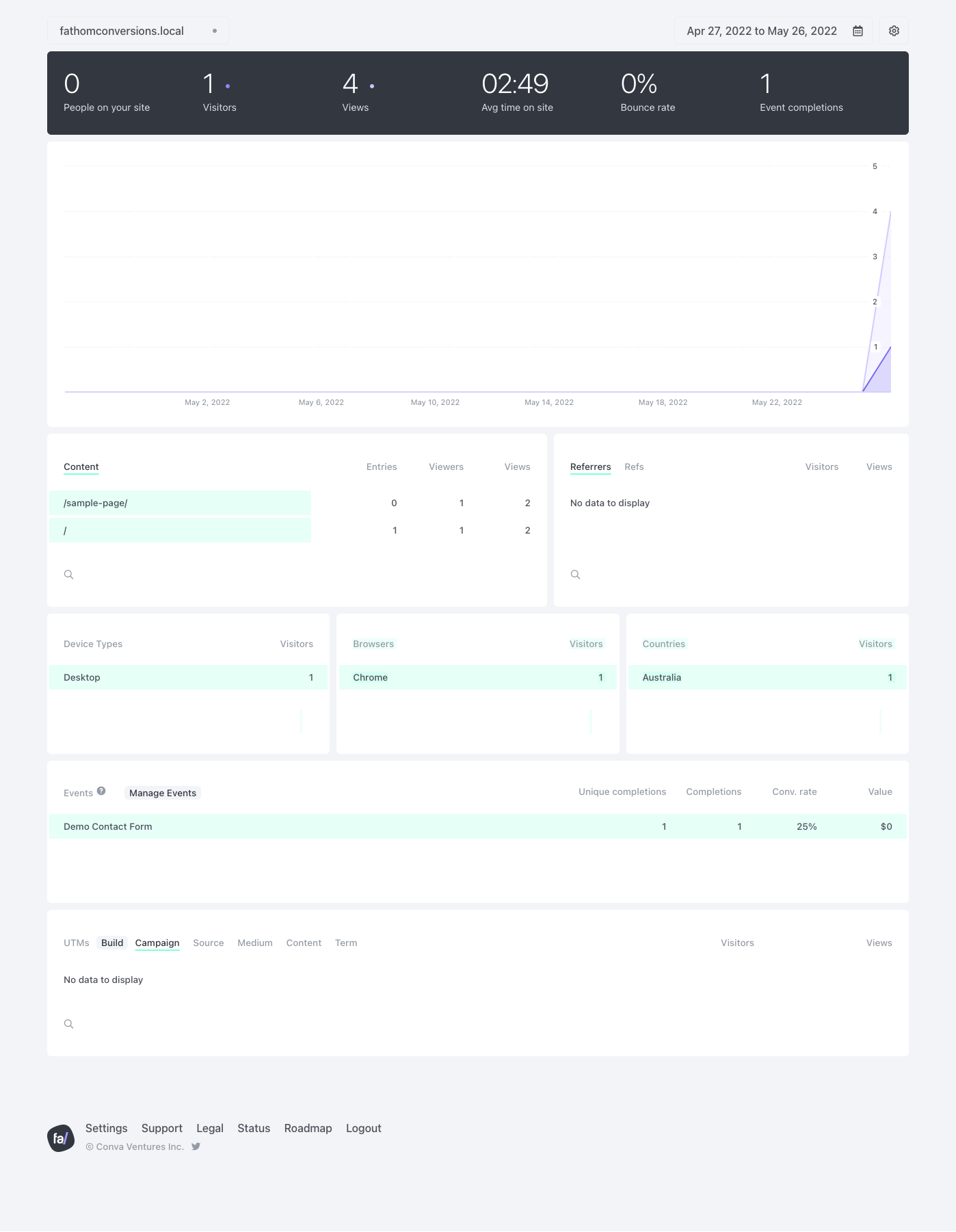
Events are created automatically in Fathom Analytics 
You will need an API Key from Fathom Analytics
Installation
This section describes how to install the plugin and get it working.
Easy method:
- From the WordPress dashboard Plugins > Add New search for ‘Fathom Analytics’ and click install then Activate
- Activate the plugin through the ‘Plugins’ menu in WordPress
- Follow the instructions on the settings page to set up your API Key
Manual method:
- Download the zip file from this page and unzip
- Upload the entire
fathom-analytics-conversionsfolder to the/wp-content/plugins/directory using your favourite FTP tool - Follow the instructions on the settings page to set up your API Key
FAQ
-
Is this an official plugin?
-
No.
The team at Fathom Analytics have been supportive of the production of this plugin, but it is not an official Fathom Analytics plugin.
-
Why did you build this plugin?
-
In January 2022 Google Analytics was deemed illegal in the EU as data would be sent to Google server’s in the US. this started our search for a more privacy focussed platform – we found Fathom Analytics.
In March 2022 Google announced sunset July 1, 2023 and data deletion (+6 months) of Google Analytics Universal, with no data being kept essentially forcing users on to Google Analytics v4. This only complicates matters for the billions of sites using Google Analytics, and does not deal with the privacy requirements of EU users.
Looking for an analytics tool to replace Google Analytics, we found Fathom and loved it for it’s simplicity and GDPR compliance. The one blocker however, was adding events was a code reliant task, something we badly wanted to be easier. The official plugin makes it easy to place the tracking code on the page, it does not add the ability to create events/conversions easily.
So to make this easier for ourselves, marketers, website owners and non-coders – we built this plugin to have the ability to easily track these user events with only a few clicks. Fathom Analytics Conversions is the no code answer for WordPress and Fathom Analytics users.
-
Who are you?
-
We are the team from SixFive and we build, host and care for our clients websites built on WordPress. We have more than 20 years experience with hundreds of clients globally.
-
How do I get started?
-
- Start by creating your account on Fathom Analytics
- Install the official Fathom Analytics plugin, and configure it with your site ID.
- Install or upload this plugin
- Go to Settings > Fathom Analytics Conversions and follow the steps to create your API Key
- Open the Fathom Analytics API Settings page
- Create a new token, using a sensible name
- Create as a ‘Site-specific key’
- Set Access to ‘Manage’ (this is because we need to create Events, not just track against them)
- Click Generate API Key
- Copy the API Key and paste into Settings > Fathom Analytics Conversions
- Click ‘Save Changes’
- Check the boxes for the installed plugins you want to track data from
The plugin will then go through all our supported plugins and create the matching events. As soon as your form has a submission it will be recorded in your Fathom Analytics dashboard.
-
I have a feature request
-
Please create a feature request in the WordPress plugin support pages.
-
I have a bug or issue
-
Please create a thread in the WordPress plugin support pages.
Reviews


Contributors & Developers
“Fathom Analytics Conversions” is open source software. The following people have contributed to this plugin.
Contributors


Translate “Fathom Analytics Conversions” into your language.
Interested in development?
Browse the code, check out the SVN repository, or subscribe to the development log by RSS.
Changelog
1.2
- Security: Fixed unauthenticated settings overwrite and multiple XSS vulnerabilities.
- Improvement: New FAC_Options class, cached queries, and conditional integration loading…
- Feature: Added
fac_track_eventhook for third-party developers. - Compatibility: Tested with WordPress 7.0.
1.1.3.4
- Fixed JS error.
1.1.3.3
- Fixed PHP Notice: Deprecated function.
1.1.3.2
- Fixed PHP Notice: _load_textdomain_just_in_time running too soon.
1.1.3.1
- Fixed PHP Notice: load_plugin_textdomain running too soon. FIXES:https://wordpress.org/support/topic/load_textdomain-running-too-soon/
1.1.3
- Fixed Gravity forms no conversions. FIXES:https://wordpress.org/support/topic/gravity-forms-no-conversions/
1.1.2.1
- Removed plugin dependencies
1.1.2
- Added plugin dependencies
1.1.1
- Fixed redirection issue when using ajax submission. FIXES:https://wordpress.org/support/topic/version-1-1-breaks-gravity-forms-with-redirect-confirmation/
1.1
- Compatibility with the latest Fathom API
1.0.13
Changed developer website
Hide the meta box for non public post types – FIXES https://wordpress.org/support/topic/hide-the-meta-box-for-non-public-post-types/
1.0.12
Added ability to add classes or id’s to elements to trigger events
1.0.11
- Added ability to flag conversion for Login and Registration events
1.0.10
- Moved JS to files to support caching plugins and deferred loading
1.0.9
- WooCommerce support, adding order total to the event
1.0.8
- Allowing custom fathom code option, and removal of reliance on official Fathom Plugin
1.0.7
- Removed check of site name
1.0.6
- Changed URL to the API Page to meet the new usefathom.com URL
1.0.5
- Added support for Gravity Forms
- Added support for Fluent Forms
- Added support for Ninja Forms
- Added support for URL based conversions
1.0.3
- Added support for WP Forms Free & Pro
1.0.1
- Added deletion of plugin settings on plugin delete
1.0
- First version supporting Contact Form 7