Mini Ajax Cart for WooCommerce

Description

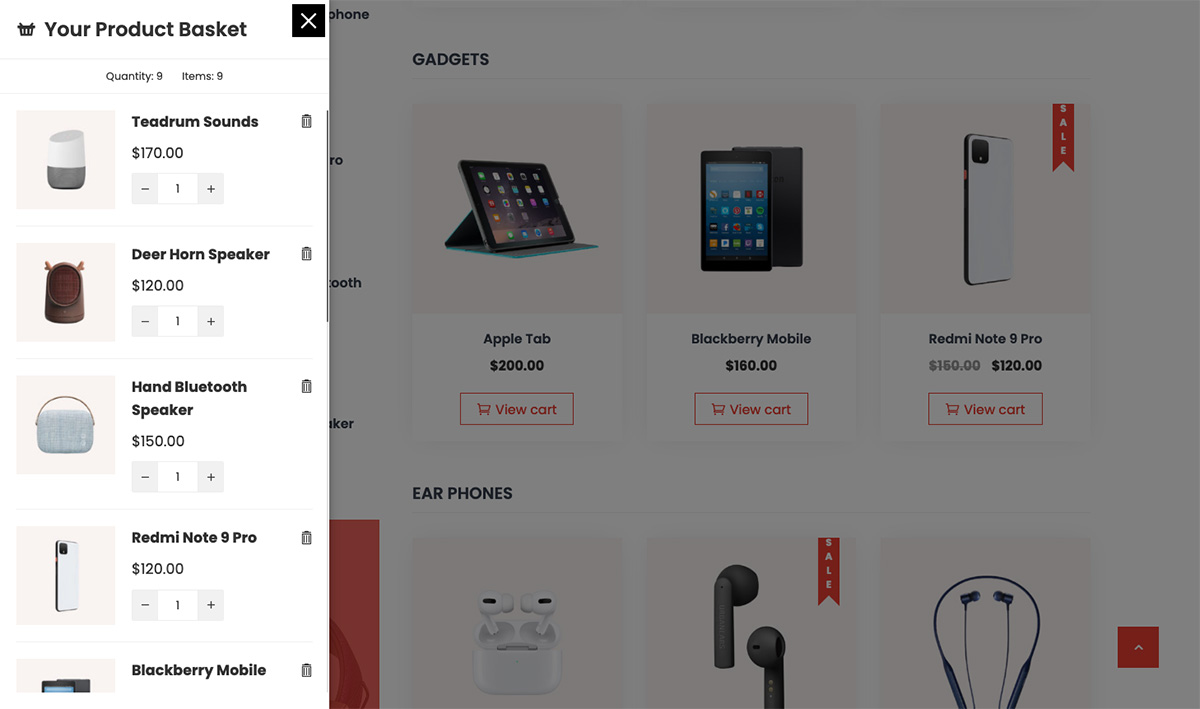
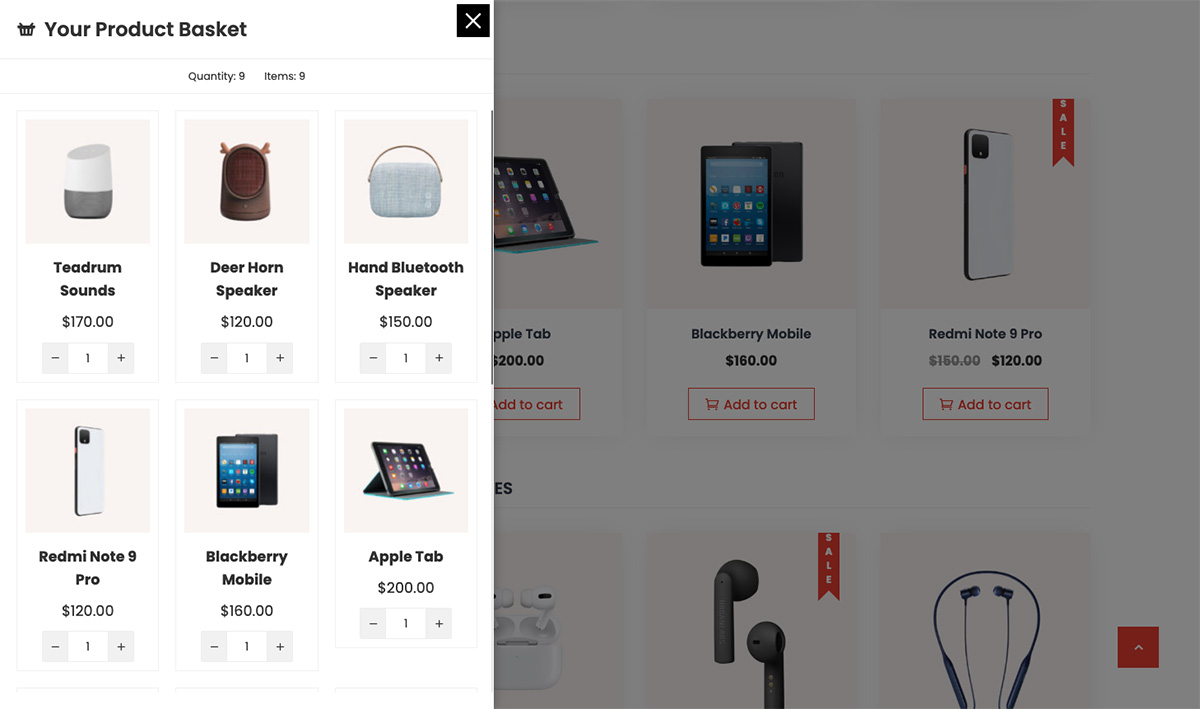
Mini Ajax Cart adds a sticky cart button to your WooCommerce store. A click on it slides the cart in from the side, so shoppers can change quantities, remove items, apply coupons and head to checkout without loading the cart page.

When a shopper has to load the cart page to see what they picked, some of them never come back. A cart that stays on screen keeps them shopping and moves them toward checkout faster.

The cart is fast and light. It loads about 11 KB of CSS on your storefront, and nothing at all on pages where no cart is enabled. It works with WooCommerce HPOS and the Cart and Checkout blocks, updates itself when products are added from WooCommerce blocks, and supports RTL languages.

👉 Test the dashboard settings without installing | View Pro demos | Documentation | Get Pro

Free Features

Carts

  • Create as many carts as you need: different carts for different pages or devices
  • Slide In cart panel that opens from the left or the right side
  • Set the panel’s content width and turn the background overlay on or off
  • RTL ready

Cart Button

  • Default cart icon, 5000+ icons from 5 icon libraries (Font Awesome, Material, Elegant, Essential and IcoFont), or upload your own image
  • 3 button shapes: Round, Square and Rounded Square
  • Place the button in the middle of the left or right side
  • Item count badge on the button
  • 3 hover animations
  • 5 open and 5 close animations for the cart panel

Cart Content

  • Header with your own title and icon
  • Change quantities and remove items right in the cart. Quantity changes respect stock, “sold individually” and minimum and maximum quantity rules
  • Show products as a List or a Grid
  • Coupon field, checked with WooCommerce’s full coupon validation
  • Show or hide the subtotal, discount and total rows
  • Show or hide the View Cart, Checkout and Continue Shopping buttons, with your own labels and Continue Shopping link
  • Prices follow your store’s currency format

Display Settings

  • Hide the cart on desktop, tablet or mobile
  • Show or hide the cart on chosen pages, posts, products, archives, custom post types, the front page, blog, search and 404 pages

Design

  • Colors for the button, panel, buttons and quantity controls
  • Typography for the header, product titles, content and buttons, with the full Google Fonts library
  • Panel background: color or your own image

Free vs Pro Page

Open Mini Ajax Cart > Free vs Pro in your dashboard to compare every feature side by side with Ultimate WooCommerce Cart.

Upgrade to Pro: Ultimate WooCommerce Cart

Mini Ajax Cart shows the cart. Ultimate WooCommerce Cart turns it into a sales tool. Every shopper who opens the cart sees a reason to add one more item: a reward they are close to unlocking, an offer at a special price, or a countdown to complete the order.

Pro uses the same carts, so the carts you build in the free version carry over when you upgrade. Nothing to rebuild.

Sales Tools That Grow Every Order

  • Cart Rewards: a tiered progress bar that unlocks free shipping, discounts and free gifts as the cart grows. Shoppers can see how close they are, so they add more. View Demo
  • Cart Offers: hand-picked products at a special price inside the cart, added in one click. Show them based on the products, categories or total in the cart. View Demo
  • Cart Timer & Low Stock Notice: a countdown in the cart and a notice when an item is running low, so shoppers check out sooner. View Demo
  • Cart Analytics: see the revenue your offers bring in, the rewards given away and how order values compare.
  • Change Options in the Cart: shoppers switch a product’s size, color or other options without removing it. View Demo
  • Save for Later: shoppers move items out of the cart and back again. The list stays on the account for logged-in shoppers.
  • Sticky Add to Cart Bar: keeps the Add to Cart button in view on product pages.
  • Shipping Methods & Order Note: shoppers pick a shipping method and add a note without leaving the cart.
  • Show to Chosen Users: show each cart to everyone, logged-in customers, guests or chosen user roles.
  • Mini-Cart Block Support: in block themes, the header Mini-Cart block opens this cart and counts stay in step.

Checkout and Sales Boosters

  • Checkout Inside the Cart: shoppers fill in their details and place the order right in the cart panel, with express payment buttons such as Apple Pay and Google Pay. View Demo
  • Added to Cart Popup: shows the added product with suggested products, rewards and offers, with 37 open and 37 close animations. View Demo
  • Suggested Products: a carousel of cross-sells, upsells, related or hand-picked products
  • Free Shipping Bar: shows how much more to spend for free shipping
  • Available Coupons List: shows the coupons any shopper can use next to the coupon field
  • Ajax Add to Cart on Product Pages: add to cart without the page reloading
  • Open the Cart When a Product Is Added View Demo

More Layouts and Designs

  • 3 cart layouts: Slide In, Floating and Popup. Slide In Demo | Floating Demo | Popup Demo
  • 15 ready-made templates, imported in one click. View Templates
  • Design the cart with Elementor using 17 cart widgets, including Rewards Bar, Cart Offers and Cart Timer. View Demo
  • Reorder or turn off cart sections with drag and drop
  • Grid columns for the product grid
  • Glassmorphism: a frosted glass look for the button and the cart. View Demo

A Cart Button That Gets Noticed

  • 11 button shapes: Round, Square, Rounded Square, Triangle, Oval, Star, Rhombus, Pentagon, Hexagon, Rabbet and an Animated Blob. View Demo
  • 7 button positions with custom offsets: any corner, the middle of either side or the bottom center
  • 29 hover animations and 9 idle animations that draw the eye to the button
  • 37 open and 37 close animations for the cart panel
  • Hide the button when the cart is empty
  • Open the cart from any menu item, button or icon by adding a class. View Demo

More Control

  • Cart shortcode: place the cart anywhere, or only its contents in a sidebar
  • Lock page scroll while the cart is open
  • Remove All button to empty the cart in one click
  • Your own empty cart text and icon
  • Import and export settings between carts or sites
  • Load Google Fonts locally, which helps with GDPR
  • Live font preview for every typography setting
  • Custom CSS
  • One-click updates and direct support from our team
  • One-time payment, no subscription

Get Ultimate WooCommerce Cart | View All Demos

Premium Upgrade

Get more sales from every cart with cart rewards, special offers, a countdown timer, checkout inside the cart and much more.

Get Ultimate WooCommerce Cart | Demo Site | Documentation

Screenshots

Installation

The easy way to install the plugin is through the WordPress.org plugin directory.

  1. Go to WordPress Dashboard > Plugins > Add New.
  2. Search for “Mini Ajax Cart” and install the plugin.
  3. Activate the plugin from the “Plugins” menu in WordPress.
  4. Go to Mini Ajax Cart > Add New to create your first cart.

FAQ

Does it work with the WooCommerce Cart and Checkout blocks?

Yes. The plugin works with WooCommerce HPOS and the Cart and Checkout blocks, and the cart updates when products are added or removed from WooCommerce blocks.

Will it slow down my store?

No. The cart loads about 11 KB of CSS on your storefront, and nothing at all on pages where no cart is enabled.

Can I show different carts on different pages?

Yes. Create as many carts as you need and choose the pages and devices each one shows on.

What does the Pro version add?

Pro, Ultimate WooCommerce Cart, adds Floating and Popup layouts, 15 templates, Elementor design, checkout inside the cart, and sales tools: cart rewards, cart offers, a countdown timer, an Added to Cart popup, save for later and analytics. Open Mini Ajax Cart > Free vs Pro in your dashboard for the full comparison, or get Pro here.

Will I lose my carts if I upgrade to Pro?

No. Pro uses the same carts, so everything you build in the free version carries over.

Reviews

August 6, 2024
Después de probar varios plugins ha sido el único compatible con otras funciones en mi web! Me gusta!
July 10, 2024
It's one of the best cart plugins I've ever used. It's very easy to install, and I can customize literally everything that suits the theme.The support was very quick to resolve my issues.
April 26, 2024 1 reply
Pues después de mucho mirar, encontré esta pequeña joya. Fácil de configurar e intuitivo. Y si quieres el PRO no es nada caro.
March 5, 2023
One of the best floating cart plugins to use. It has a lot of functions that are great for conversions on a shopping site. Exellent support for the plugin, I personally had to ask the plugindeveloper for help. The quick response and everything so well solved a problem for me that I tried for quite some time to solve myself. The free plugin itself provides quite a few functions. But I preferred to upgrade to Pro, which adds a lot more functions for little money. It really is a plugin worth every cent.
September 4, 2021
I rather like this plugin and prefer it over the sticky add to cart ones. Useful on a mobile, offering a quick way of viewing the basket, checkout or continue shopping, rather than having to scroll back to the top if sticky headers are not an option. Able to decide exactly which pages the floating button should appear on too. I didn't see in the config how to change the colours of the number of items in basket, but that's a small thing.
Read all 6 reviews

Contributors & Developers

“Mini Ajax Cart for WooCommerce” is open source software. The following people have contributed to this plugin.

Contributors

“Mini Ajax Cart for WooCommerce” has been translated into 1 locale. Thank you to the translators for their contributions.

Translate “Mini Ajax Cart for WooCommerce” into your language.

Interested in development?

Browse the code, check out the SVN repository, or subscribe to the development log by RSS.

Changelog

1.3.5 – 2 Oct, 2026

  • Compatibility test with WordPress version 7.1 and WooCommerce 11.1
  • Declared compatibility with WooCommerce HPOS and the Cart and Checkout blocks
  • Cart now refreshes when products are added or removed from WooCommerce blocks
  • Translations now load from the plugin’s languages folder
  • Replaced deprecated jQuery calls
  • Security: only store managers can create or edit carts, and cart quantity changes now respect stock and “sold individually” limits
  • Coupons are now checked with WooCommerce’s full coupon validation
  • Security: direct file access is blocked on all plugin files, and cart quantity changes respect minimum and maximum quantity rules
  • Saving a cart no longer erases settings made in Ultimate WooCommerce Cart
  • Prices in the cart follow the store’s currency format
  • Selected Google Fonts now load on the front end
  • The cart now shows on 404 and empty search pages when enabled there
  • Admin icon fonts and scripts only load on the cart screens
  • Faster storefront: the cart loads about 11 KB of CSS instead of about 1 MB, and nothing at all when no cart is enabled
  • Fixed cart animations not loading when the theme has its own animate.css
  • Fixed the first product added on a slow page load sometimes not showing in the cart
  • New Free vs Pro page under the Mini Ajax Cart menu, comparing every feature with Ultimate WooCommerce Cart. It replaces the Upgrade To Pro tab in each cart’s settings

1.3.4 – 6 Dec, 2025

  • Compatibility test with WordPress version 6.9

1.3.3 – 26 Nov, 2025

  • Compatibility test with latest WordPress

1.3.2 – 16 Oct, 2025

  • Product count bug fixed

1.3.1 – 3 Mar, 2025

  • Translation fixes

1.3.0 – 7 Feb, 2025

  • Minor Fixes

1.2.9 – 29 Jan, 2025

  • Conditional logic for Nonce Check – Fixed

1.2.8 – 13 Dec, 2024

  • Undefined property: MAJC_Frontend::$checkNonce Error – Fixed

1.2.7 – 21 Jul, 2024

  • Compatibility test with WordPress 6.6

1.2.6 – 13 May, 2024

  • wc-cart-fragments enqueued – Added

1.2.5 – 25 Mar, 2024

  • Bug fixes

1.2.4 – 25 Mar, 2024

  • Minor fixes

1.2.3 – 02 Jan, 2024

  • Compatibility test with latest WordPress

1.2.2 – 10 Oct, 2023

  • Documentation link added

1.2.1 – 25 Sep, 2023

  • Spelling Correction

1.2.0 – 30 Aug, 2023

  • Language folder naming issue fixed for translation – Fixed

1.1.9 – 9 May, 2023

  • RTL ready – Added

1.1.8 – 1 May, 2023

  • Code refinement
  • Compatibility test with WordPress 6.2

1.1.7 – 2 Mar, 2023

  • Review Notice – Added

1.1.6 – 1 Mar, 2023

  • Font Icons updated to latest version

1.1.5 – 11 Jan, 2023

  • Readme.txt file updated

1.1.4

  • Display settings issue fixed

1.1.3

  • Complete admin interface design refinement
  • Google Fonts list updated

1.1.2

  • Cart button hidden under slider issue fixed

1.1.1

  • Minor fixes

1.1.0

  • Cart button getting hidden due to z index issue fixed
  • more undefined index error fixed

1.0.8

  • Undefined index error in typography fixed

1.0.7

  • Change in admin design
  • Redesign

1.0.6

  • Code hooked to wp_footer instead of wp_head due to conflict with other plugin

1.0.5

  • Plugin issue with multisite fixed
  • Font Icons to updated to the latest version

1.0.4

  • Latest Wp Version Compatibility
  • Remove Deprecated Codes

1.0.3

  • Latest Wp Version Compatibility
  • Minor Bug fixes

1.0.2

  • Fix CSS issue in the frontend popup
  • Minor Bug fixes in the php file

1.0.1

  • Merge the free and pro version data
  • Add the upgrade to pro banner in backend

1.0.0

  • Release