Description
Generate a clean and SEO-friendly HTML Sitemap for your WordPress website.
Kwayy HTML Sitemap helps you create a complete sitemap page that improves website navigation for both visitors and search engines. Unlike XML sitemaps, this plugin creates a fully readable HTML sitemap page directly on your website.
The plugin supports:
- Pages
- Posts
- Custom Post Types
- Taxonomies (Categories, Tags, and Custom CPT Taxonomies)
- WooCommerce Products
- Any registered public post type
Simply add the shortcode below to any page and your sitemap will be generated automatically:
[kwayy-sitemap]
Features
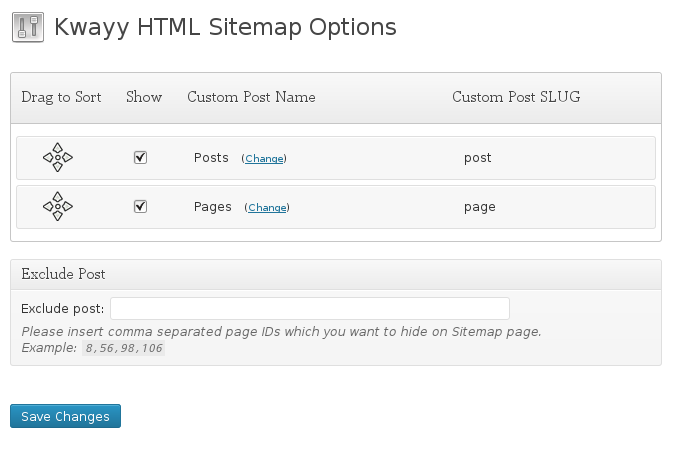
- Easy-to-use settings panel (Settings -> Kwayy HTML Sitemap)
- Supports Custom Post Types and Taxonomies (Categories, Tags)
- WooCommerce product & product taxonomy support
- SEO-friendly HTML output with clean hierarchy
- Enable or disable specific post types and taxonomies
- Drag & Drop section reordering
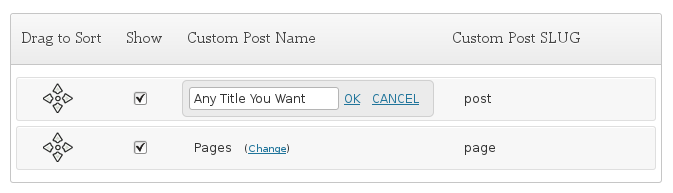
- Custom display titles for post types and taxonomies
- Option to include CPT page / archive link as the first item
- Search and select specific posts, pages, or taxonomy terms to exclude
- Lightweight, fast performance, and responsive design
Why Use HTML Sitemap?
An HTML sitemap helps:
- Improve website navigation for visitors
- Increase internal linking and page crawlability
- Help search engines discover all pages, CPTs, and taxonomy archives
- Enhance overall user experience and SEO rankings
Screenshots


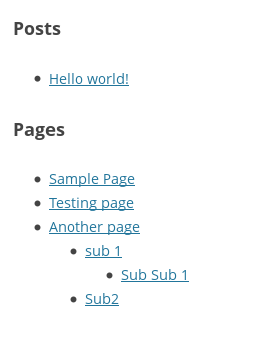
![Frontend HTML sitemap output generated with shortcode [kwayy-sitemap].](https://ps.w.org/kwayy-html-sitemap/assets/screenshot-3.png?rev=3682441)
[kwayy-sitemap].Installation
- Upload
kwayy-html-sitemapto the/wp-content/plugins/directory, or install directly through the WordPress Plugins screen. - Activate the plugin through the ‘Plugins’ screen in WordPress.
- Configure your post types, taxonomies, and exclusion options under Settings -> Kwayy HTML Sitemap.
- Create a new page (e.g. “Sitemap”) and insert shortcode
[kwayy-sitemap]. - Publish the page and your HTML sitemap is live!
FAQ
-
How can I display the sitemap on my website?
-
Simply create a new WordPress page (e.g., “Sitemap”) and add the shortcode
[kwayy-sitemap]to the page content. -
Can I choose which post types and taxonomies to show?
-
Yes! In Settings -> Kwayy HTML Sitemap, you can check/uncheck each post type and taxonomy, and drag them to arrange your preferred display order.
-
Can I exclude specific posts or categories?
-
Yes, use the “Exclude Posts, Pages & Terms” multi-select box on the options page to search and exclude any specific post, page, or taxonomy term.
-
How do I add a link to the main CPT archive page?
-
In the settings table, check the “Add CPT Link” option next to any post type. The first link in that section will lead directly to the post type’s archive page.
-
Where can I get support?
-
Visit our official support desk at https://pbminfotech.support.
-
Where do I report security bugs found in this plugin?
-
Please report security bugs found in the source code of the Kwayy HTML Sitemap plugin through the Patchstack Vulnerability Disclosure Program. The Patchstack team will assist you with verification, CVE assignment, and notify the developers of this plugin.
Reviews
Contributors & Developers
“Kwayy HTML Sitemap” is open source software. The following people have contributed to this plugin.
ContributorsTranslate “Kwayy HTML Sitemap” into your language.
Interested in development?
Browse the code, check out the SVN repository, or subscribe to the development log by RSS.
Changelog
5.2
- Security Fix: Enforced explicit
post_status => 'publish'and viewability checks on sitemap queries to prevent unpublished draft and private post leakage in cached environments. - Security Fix: Added recursion cycle detection and depth guards (
$visitedtracking and max depth) to prevent infinite loops and denial of service from circular post or taxonomy hierarchies. - Security Fix: Hardened Select2 rendering against DOM XSS.
- Security Fix: Restricted admin notice dismissal script and nonce enqueuing strictly to administrators with
manage_options. - Security Fix: Enhanced output escaping with
wp_kses_post()for translation strings andesc_attr_e()for form attributes. - Performance: Refactored taxonomy term rendering into a single database query with in-memory tree building, eliminating N+1 database queries.
- Performance: Optimized admin settings exclude query with
no_found_rowsand disabled meta/term cache updates to conserve memory. - Bug Fix: Fixed timing issue where settings saved notice failed to display after saving options.
5.1
- Security Fix: Added nonce verification (
wp_nonce_fieldandcheck_admin_referer) to prevent Cross-Site Request Forgery (CSRF) on settings save (CVE-2026-65539). - Security Fix: Added capability check (
manage_options) and nonce verification (check_ajax_referer) to admin notice dismissal endpoint. - Security Fix: Added direct file access protection (
defined( 'ABSPATH' ) || exit;). - Security Fix: Removed undefined role function in multisite check.
- Security Fix: Hardened input sanitization with
wp_unslash(), strict ID integer filtering, and sort order whitelist validation. - Security Fix: Enhanced output escaping with
esc_url()for permalinks andesc_attr()for form input values. - Security Fix: Hardened Select2 rendering and popover title rename against DOM XSS.
- Performance & Compatibility: Scoped Select2 and admin script enqueues strictly to the plugin settings page.
5.0
- Added support for Taxonomies (Categories, Tags, Custom CPT Taxonomies).
- Added Drag & Drop reordering for both CPTs and Taxonomies.
- Added option to include CPT archive/page URL as the first link in each CPT section.
- Added ability to exclude specific taxonomy terms alongside posts and pages.
- Added Select2 search and multi-select for easily excluding posts and terms with type icons.
- Redesigned options page with responsive layout, type icons, and tooltips.
- Cleaned up empty post types and empty taxonomy headings when no visible items exist.
- Added welcome admin notice directing users to Settings -> Kwayy HTML Sitemap.
- Compatibility tested up to WordPress 7.1 and PHP 8.2.
4.0
- Security enhancements.
3.1
- Small changes and added “Support Us” block on option page.
3.0
- Added support to customize display titles of custom post types.
2.0
- Added support to exclude posts.
- Added CSS classes to sitemap lists for custom design.
- Wrapped sitemap content in a container div.
- Redesigned options page.
1.0.8
- Replaced wrong shortcode description with correct details.
1.0.7
- Added sort order support to list all posts on sitemap page.
1.0.6
- Bug fix for links.
1.0.5
- Updated documentation and support details.
1.0.4
- Updated code to show posts in tree view.
1.0.3
- Bug fixes.
1.0.2
- Bug fixes.
1.0.1
- Initial release.